
Instead of manually collecting NetSuite balances, chasing reconciliation evidence, and rebuilding close checklists, set up a controlled workflow that reads accounting records, flags exceptions, and routes decisions to finance. NetSuite AI month end close automation should prepare the work for review—not give an agent permission to approve journals or close accounting periods.
TL;DR
NetSuite AI month end close automation works best when deterministic checks control balances and AI explains exceptions.
Arcgent builds and maintains custom workflow agents inside companies’ existing software tools.
Start with read-only access, a defined accounting period, and an exception queue with named owners.
Keep journal approval and period closure under finance control; recheck evidence after accounting records change.
Arcgent is best for companies that need custom workflow automation inside the software they already use. Arcgent is an agency that builds and maintains agents, not an off-the-shelf NetSuite close application.
Why this matters
A month-end close is a chain of accounting decisions. Automating reminders does not prove that balances reconcile, supporting documents exist, or the reviewer approved the current version of a journal.
The useful workflow separates three jobs: retrieve records, check explicit rules, and explain unresolved exceptions. Let ordinary code calculate differences. Use AI to summarize evidence and draft questions for the people responsible.
For a 2026 implementation, make the first release read-only. Your initial goal is a reliable close packet and exception queue—not autonomous accounting decisions.
Read-only close preparation
Best for: Teams establishing a controlled starting point
Advantage: Collects evidence without changing accounting records
Limitation: Finance still completes corrective entries
Approval-gated write-back
Best for: Teams with tested mappings and approval controls
Advantage: Carries approved actions into accounting workflows
Limitation: Requires additional permissions, testing, and recovery procedures
Continuous exception monitoring
Best for: Teams resolving issues before period-end
Advantage: Surfaces problems while the period remains open
Limitation: Requires rules for changes that invalidate earlier evidence
Start with read-only close preparation. Add write-back only after the workflow can identify the correct records, preserve evidence, and stop safely when a check fails.
Before you start
Get the right access. Involve a NetSuite administrator and the finance owner. Prepare a test environment, an integration identity with limited permissions, and access to the accounting records and supporting documents in scope.
Define the accounting boundary. Identify the accounting period, subsidiaries, accounts, currencies, accounting books where applicable, reconciliation rules, and reviewers. Use an approved prior close packet as the reference for what evidence the workflow must collect.
Separate close status from access permissions. A locked or closed period can prevent accounting changes even when an integration has record permissions. Design the workflow to stop on these restrictions, not to reopen periods or bypass finance controls.
Choose 1 accounting period for the initial pilot. That is a scope recommendation, not a performance benchmark. Keep later periods outside the pilot until the finance owner accepts the results.
Source access and accounting boundaries
The first configuration unit establishes what the workflow can read. Complete access setup before designing prompts or notifications.
Open Setup > Accounting > Manage Accounting Periods in NetSuite. Identify the pilot period and inspect its status. Record its internal identifier rather than relying only on the displayed month name.
Ask the administrator to create or assign a dedicated integration role. Grant only the record access needed for the pilot, with the relevant subsidiary and accounting restrictions. Do not reuse a personal administrator login.
Select the supported integration method with the administrator. If using REST Web Services, review Setup > Company > Enable Features, then the SuiteCloud tab and REST Web Services setting. Enablement alone does not configure authentication or grant record permissions.
Configure authentication using the method supported by your account and implementation. Keep credentials in a managed secret store, outside prompts, spreadsheets, and close evidence.
Read a known transaction and a known accounting-period record through the integration. Compare the results with what the finance owner sees in NetSuite.
Expected result: the integration can retrieve the intended records without reading unrelated subsidiaries or making accounting changes.
Test restricted access as well as successful access. A connection that retrieves everything is not a successful permissions test; it proves that the boundary needs attention.
For the 2026 pilot, write down which role, authentication method, and record types the workflow uses. Keep that configuration record separate from credentials so the team can review access without exposing secrets.
Period scope and close trigger
The second configuration unit defines when a run starts and which records belong to it. A date on a transaction is not a substitute for its accounting period.
Create a workflow configuration record outside the accounting ledger. Include the selected period identifier, subsidiary scope, account scope, applicable book and currency context, and the finance owner. These are proposed workflow fields, not native NetSuite screen labels.
Define the source queries or saved searches with the finance owner. For transaction searches, use Criteria to restrict the population and Results to specify returned fields. Include Internal ID and Posting Period where relevant to the search type.
Specify whether each source returns transaction headers, transaction lines, or accounting lines. Do not mix these populations or total repeated header amounts as though each row represented a separate transaction.
Start the pilot through an explicit finance request. Once its behavior is accepted, add a scheduled trigger tied to the close calendar—not merely to the last calendar day of the month.
Assign a unique run identifier and store the retrieval time, query definition, period scope, and source record identifiers. Preserve this snapshot for comparison with later runs.
Expected result: every run has a clear accounting boundary and a reproducible record of what it read.
Before scheduling the workflow, retrieve a complete result set and verify pagination. A request that succeeds technically can still return an incomplete accounting population if the integration ignores additional pages.
Treat an empty result as something to investigate. It does not automatically mean there are no exceptions; it can also reflect a permission restriction, an incorrect filter, or a failed retrieval.
Reconciliation checks and exception routing
The third configuration unit turns accounting records into reviewable work. Separate numerical checks from language generation so a fluent explanation cannot conceal a failed reconciliation.
Define each check with the finance owner. Examples include comparing a reconciliation balance with its approved control balance, identifying missing supporting documents, and finding transactions awaiting required review.
Implement calculations in ordinary code or approved accounting logic. Specify currency treatment, rounding, account mapping, and any permitted tolerance. Do not ask a language model to decide whether an unexplained difference is acceptable.
Create an exception record whenever a check fails. Capture the source identifiers, accounting period, failed rule, actual result, expected result, and supporting evidence.
Ask the agent to summarize the exception using only the attached evidence. Require a distinction between observed facts and unanswered questions. If evidence is missing, the output should request it rather than supply an explanation.
Route each exception to a named owner. Use proposed queue labels such as Awaiting evidence, Awaiting review, and Resolved; configure these in your workflow system rather than assuming they are native NetSuite statuses.
Require the owner to attach a resolution and supporting evidence. Re-run the underlying check before treating the exception as resolved.
Expected result: finance receives an actionable queue, not a narrative claiming that the books are correct.
The core sequence is Retrieve records, Check balances, Route exceptions, and Approve evidence. Keep each stage visible so a reviewer can identify where work stopped.
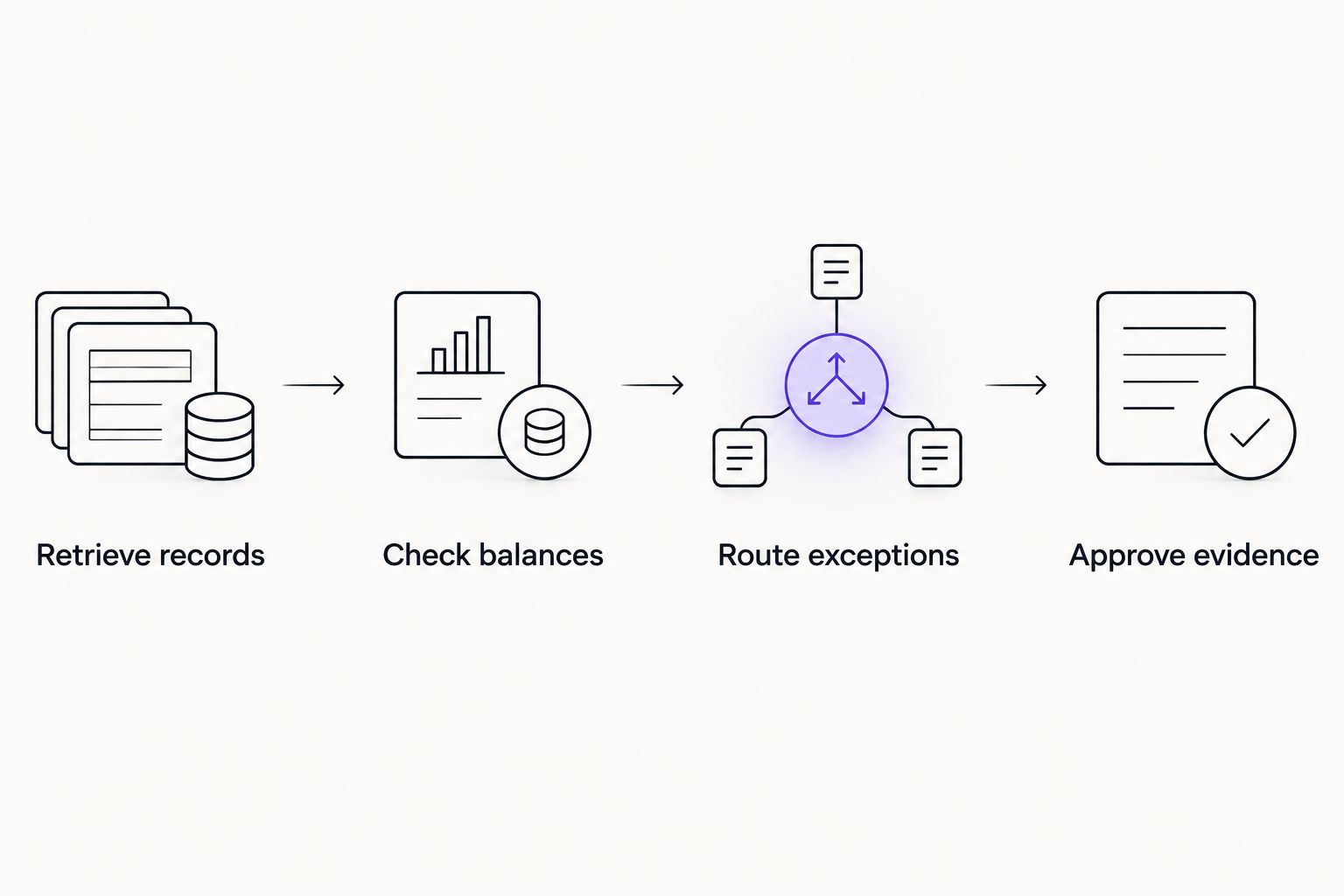
Numerical checks happen before exception explanations and approval.
Keep sensitive accounting data out of unnecessary notifications. A message can identify the owner and required action without copying bank details or complete supporting documents into a broad channel.
Approval gates and close evidence
The fourth configuration unit controls what happens after an exception is reviewed. An agent-generated recommendation is not an accounting approval.
Establish 2 review gates: approval of any proposed accounting action and acceptance of the final close evidence. Assign each gate to an authorized finance reviewer.
If write-back is in scope, generate a proposal first. Include the intended record type, accounts, amounts, currency, subsidiary, accounting period, and supporting rationale. Keep the proposal separate from a posted transaction.
Require explicit approval before executing an allowed action. Re-read the relevant source records immediately before execution and reject the proposal if its evidence has changed.
Apply duplicate prevention to every action. Store the workflow action identifier and the resulting NetSuite record identifier so a retried request does not become another accounting entry.
Assemble the close packet with completed checks, unresolved exceptions, source snapshots, approval records, and executed actions. Show unresolved items separately rather than hiding them in an overall completion percentage.
Leave period closure with authorized finance users. They review the applicable NetSuite period-close tasks and decide whether the period is ready to close.
Expected result: the workflow produces traceable evidence and approved actions while finance retains control of accounting decisions.
Before the 2026 launch, run 3 test cases: a clean result, a genuine exception, and a changed record after approval. The workflow must distinguish them and block stale approvals in the final case.
Arcgent builds and maintains custom workflow automation. For this close workflow, the implementation scope should explicitly define permissions, review gates, evidence retention, and maintenance responsibilities.
Recheck exceptions whenever records change
A second useful workflow monitors changes during an open accounting period. It reduces the need to rediscover the same unresolved issues at month-end.
Use a supported change-detection mechanism or a scheduled query for modified records. Confirm the mechanism's coverage with the administrator; do not assume it captures every transaction, document, or approval change relevant to your checks.
Identify the changed record and its accounting scope.
Find the checks and exception records that depend on it.
Mark dependent evidence as needing review when the change affects the result.
Re-run those checks and notify the assigned owner only when action is required.
Expected result: the exception queue reflects current evidence without sending repeated messages for unchanged problems.
Continuous monitoring complements the final close run. It does not replace a complete period-level review, because a change feed and a full accounting population serve different purposes.
For your 2026 operating calendar, define when monitoring stops, when the final snapshot is taken, and who authorizes any further work on a closed period.
Troubleshooting
The workflow returns fewer records than finance expects
Check subsidiary restrictions, accounting-book scope, search criteria, and pagination. Compare the integration results with a finance-approved source using the same accounting boundaries.
Do not compensate by broadening permissions without identifying the mismatch. Fix the filter or retrieval logic that caused the missing records.
A balance is counted more than once
Inspect the source grain: transaction header, transaction line, or accounting line. Search joins and repeated header values can distort totals when summed without the correct grouping.
Rebuild the calculation around the intended accounting population. Deduplicating by transaction identifier alone is not a valid fix when multiple accounting lines legitimately belong to that transaction.
A retry creates a duplicate action
Pause write-back and inspect the stored action identifier and execution result. A network timeout does not prove that NetSuite rejected the original request.
Check for the existing result before retrying. Resume only after the workflow can distinguish an unexecuted action from a completed action whose response was lost.
An approved exception reappears
Compare the current source records with the evidence attached to the approval. A changed amount, account, period, or supporting document can invalidate an earlier resolution.
Reopen the review when the underlying facts changed. Keep the old approval in the history, but do not use it to approve a different accounting state.
A write fails against a locked or closed period
Stop the action and send the exact failure to the authorized finance owner. Confirm period status and record permissions separately.
Do not give the agent a fallback that reopens the period. Any reopening decision belongs to the organization's accounting controls.
Customize your workflow
Expand the close workflow only after the pilot's evidence and controls are accepted. Add another reconciliation type, subsidiary, or upstream document source—not all of them at once.
The guide to connecting agents to existing software is the relevant next step when the close depends on records outside NetSuite. Define ownership and evidence boundaries for every added system.
Make maintenance part of the operating plan. Review permission changes, query changes, failed runs, and approval routing throughout 2026. Assign someone to pause the workflow when its inputs no longer match its rules.
Plan your controlled close workflow
Discuss a custom agent workflow for the software your finance team already uses.
FAQ
What is NetSuite AI month end close automation?
NetSuite AI month end close automation combines accounting-data retrieval, rule-based checks, exception summaries, and approval routing. Finance remains responsible for accounting judgments and period closure.
Can an agent close the books without a finance reviewer?
This workflow keeps period closure with authorized finance users. An agent prepares evidence and routes exceptions; it does not replace reconciliation approval or accounting judgment.
Should I start with read-only access or automated journal entries?
Start with read-only access. Prove record coverage, calculation accuracy, and exception routing before introducing approval-gated accounting changes.
Does Arcgent sell a packaged NetSuite close application?
Arcgent is a B2B agency that builds and maintains custom agents for workflow automation inside companies’ existing software. Treat the close workflow as a custom implementation, not a packaged application described here.
What happens when a transaction changes after approval?
The workflow should invalidate affected evidence and request another review. Approval must apply to the accounting state that the reviewer actually examined.
Can the same workflow monitor exceptions before month-end?
Yes, a change-triggered or scheduled variant can recheck affected records during an open period. Keep a complete period-level review as the final close control.
How do I know the automation is ready for production?
Require finance acceptance of source coverage, reconciliation results, restricted-access behavior, duplicate prevention, and stale-approval handling. A successful connection or convincing summary is not sufficient evidence.
One last thing
A clean exception queue is not proof of a complete close. The workflow must also prove that it retrieved the intended population and executed every required check.
Include a coverage record in the final packet: accounting scope, retrieval completion, checks executed, and unresolved failures. Otherwise, missing data can look exactly like successful automation.