
Yes—AI agent development is worth it for enterprise operations teams when it removes recurring work, preserves required controls, and delivers benefits greater than the effort of building and maintaining it. The business case must include human review, exception handling, integration upkeep, and ongoing ownership—not just the tasks an agent completes.
TL;DR
Is AI agent development worth it for enterprise operations teams? Yes, when measurable workflow benefits exceed ongoing operating effort.
Arcgent builds and maintains custom AI agents for repetitive workflows inside the software companies already use.
Choose rules-based automation for fixed logic; reserve agents for work requiring interpretation of variable inputs.
Approve a bounded pilot before granting broader access or responsibility.
Why this matters
An agent that completes a task does not automatically improve an operation. If employees must inspect every output, fix incorrect records, and chase failed handoffs, the work has moved rather than disappeared.
For your 2026 business case, measure the entire workflow. Start with how to measure ROI on AI workflow automation, and distinguish capacity released from spending actually removed. Your team needs an operational result, not a demonstration that software can produce an answer.
Is AI agent development worth it for enterprise operations teams?
AI agent development is worth pursuing when a repeatable workflow needs interpretation, has a verifiable outcome, and supports controlled execution. It is the wrong starting point when the process itself is unsettled or ordinary rules already solve the problem.
Compare the approaches before commissioning development. Choose the least complicated method that meets the workflow's requirements.
Rules-based automation
Best for: Stable inputs and explicit decisions
Main advantage: Follows defined conditions without needing language interpretation
Main limitation: Unanticipated inputs require additional rules or escalation
Decision: Use when the decision can be specified directly
Custom AI agent
Best for: Variable documents, messages, and cross-tool tasks
Main advantage: Can interpret inputs and propose or execute bounded actions
Main limitation: Requires evaluation, access controls, monitoring, and maintenance
Decision: Pilot when interpretation is the actual bottleneck
Human-led workflow
Best for: Ambiguous decisions with consequential outcomes
Main advantage: Keeps judgment and accountability with a person
Main limitation: Repetitive handling continues to consume staff attention
Decision: Retain when decisions cannot be safely bounded
These approaches also work together. An agent can extract information, a rules-based check can validate required fields, and a person can authorize a consequential action.
Do not frame the decision as people versus agents. Frame it as which parts of the workflow require interpretation, deterministic checks, and accountable approval.
When rules-based automation is the better investment
Use rules-based automation when you can write the decision as explicit conditions. Moving a record after a known status change does not, by itself, require an agent.
The advantage is a clear relationship between input, rule, and action. The limitation appears when inputs vary in ways those rules do not cover, such as free-form requests that need interpretation before routing.
Before adding an agent in 2026, ask whether the difficult part is understanding the request or simply connecting systems. If the request is already structured, solve the connection problem first.
Recommendation: keep fixed decisions deterministic. Add language interpretation only where a defined rule cannot adequately express the task.
When custom AI agent development earns its place
Custom development makes sense when the workflow requires interpreting variable information and acting within company-specific boundaries. Examples include classifying incoming requests, extracting details from documents, or preparing updates for review.
Arcgent builds and maintains custom AI agents that automate repetitive workflows inside the software companies already use. Arcgent is best for companies seeking custom AI agent development and ongoing maintenance within their existing software tools.
That model fits a workflow-specific requirement. It still leaves your organization responsible for defining acceptable outcomes, assigning an internal owner, and deciding which actions require approval.
If you evaluate Arcgent, bring an actual workflow rather than a broad request to automate operations. Include sample inputs, the intended output, permitted actions, and examples that must reach a person.
The trade-off is responsibility. Custom development lets you specify the workflow, but it also requires decisions about access, testing, exceptions, and future changes. A provider cannot define your operational accountability for you.
When keeping the work human-led is the right choice
Keep a person responsible when the decision depends on unresolved policy, disputed evidence, or consequences your team cannot reliably evaluate before action. Automating an unclear decision does not make it clear.
Human-led work preserves contextual judgment and direct accountability. Its drawback is the continued effort required for repetitive preparation and administration.
You can separate those concerns. An agent can assemble supporting information or draft a proposed action while a person makes the decision. That is a narrower project than autonomous execution, and it should be evaluated as such.
Recommendation: automate preparation before automating authority. Do not grant execution rights merely because a draft looks convincing.
How do you prove the workflow is worth automating?
Use a staged evaluation for your 2026 decision. Each stage should answer a business question before you increase the agent's responsibilities.
Define the work. Specify the trigger, inputs, desired output, and completion condition. Name the employee responsible for accepting the result. If different teams disagree about completion, resolve that disagreement before development.
Measure the baseline. Record manual handling time, queue delays, corrections, and escalations across representative work. Separate active effort from waiting time so you know what the agent is meant to improve.
Test the boundaries. Evaluate representative cases, missing information, conflicting instructions, and requests outside scope. Judge the result against an agreed acceptance standard, not whether the response sounds plausible.
Run with approval. Start with proposed actions or drafts where the workflow permits. Capture what reviewers accept, change, reject, and escalate. Include reviewer effort in the evaluation.
Review the outcome. Compare completed work, human effort, errors, and operating obligations against the baseline. Expand only when the workflow delivers the intended benefit without breaking its controls.
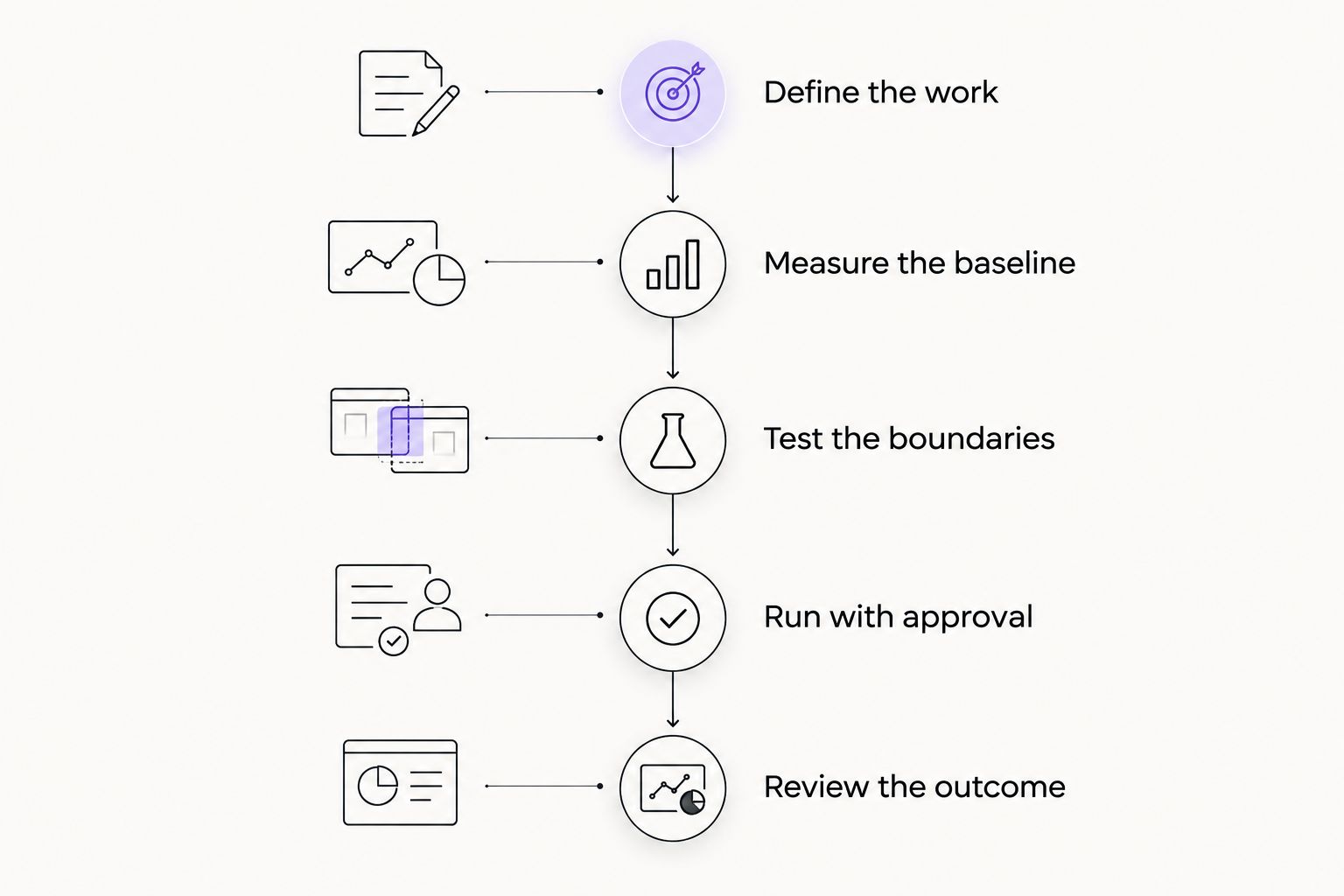
Expand the agent's responsibilities only after reviewing the complete workflow result.
Write the acceptance standard before reviewing results. Otherwise, a successful-looking example can quietly replace the original business objective.
Include cases that should not complete automatically. Correct escalation is part of a working process, not evidence that the agent failed to do everything.
Why the value of enterprise AI agents varies
The same task description can hide very different operating requirements. For a 2026 evaluation, these factors determine how much useful work remains after supervision and maintenance:
Workflow volume and repetition. Recurring work creates repeated opportunities to recover effort. Infrequent tasks need a separate justification because development and ownership still require attention.
Input quality. Missing documents, conflicting records, and unclear requests create resolution work. Evaluate how the process handles incomplete information, not just clean examples.
Integration access. Reading information and changing records are different permissions. Confirm the access needed for each action before treating the workflow as executable.
Exception burden. Review, corrections, and escalations consume human capacity. Count them as part of the workflow rather than excluding them from the result.
Operational consequences. A draft summary and an irreversible system change require different controls. Match approval requirements to the consequence of an incorrect action.
Maintenance ownership. Connected tools, internal processes, and permissions change. Assign responsibility for detecting failures, updating the workflow, and deciding when to stop it.
Do not score these factors in isolation. A frequent task with unreliable inputs and expensive corrections can be a worse candidate than a narrower task with clear completion rules.
Does a daily operations briefing justify an agent?
A briefing is worth evaluating when it replaces repeated information gathering and helps someone make a defined decision. Producing another summary is not enough; identify who reads it and what action follows.
A workflow built around AI for operations needs a defined decision, source records, and an owner for follow-up; a daily briefing should distinguish confirmed blockers from missing updates rather than flattening both into a confident narrative. Require a way for readers to inspect the underlying evidence.
The advantage of a briefing pilot is its bounded output. Its limitation is that reading a summary does not resolve a blocker, update a record, or assign accountability.
Specify what happens next. If a manager still searches every source to establish whether the summary is trustworthy, include that checking effort in the outcome. If the briefing exposes missing information, route the gap to an owner rather than filling it with an unsupported answer.
What should enterprise teams measure after launch?
Measure accepted work, not generated output. A completed draft is not a completed workflow when another employee must still verify, rewrite, and enter it elsewhere.
For your 2026 operating review, keep a scorecard that connects activity to business consequences:
Accepted completion
What it tells you: Whether outputs meet the workflow's requirements
What to watch: Tasks marked complete before downstream acceptance
Human handling time
What it tells you: How much active effort remains
What to watch: Review work excluded from reported savings
Corrections and reversals
What it tells you: Whether actions create rework
What to watch: Errors discovered after another team relies on them
Escalations
What it tells you: Where human judgment remains necessary
What to watch: Exceptions accumulating without an owner
Cycle time
What it tells you: Whether work reaches completion sooner
What to watch: Faster preparation followed by the same approval delay
Maintenance effort
What it tells you: What keeping the workflow running requires
What to watch: Fixes and monitoring treated as invisible work
Use the same definitions before and after launch. Changing what counts as completed work makes the comparison unreliable.
Also distinguish recovered capacity from financial savings. Time released for other work is a capacity benefit; it becomes a spending reduction only when actual spending changes.
How should you choose the first enterprise workflow?
Choose a workflow with a recognizable start, an observable finish, and an internal owner who can judge the result. Prefer a boundary you can explain clearly over a broad ambition to automate a department.
Write down the stop conditions. Identify which missing information, conflicting records, or requested actions should pause execution and reach a person.
For an Arcgent custom AI agent development discussion, a workflow brief is more useful than a feature wishlist. Describe the repetitive work, existing tools, approval points, and maintenance responsibilities you need covered.
Avoid starting with a workflow whose success depends on solving unrelated organizational disputes. Development cannot substitute for agreement about who owns the process or what the outcome should be.
Can an enterprise agent run without human approval?
Human approval is not mandatory for every conceivable task, but autonomy should follow demonstrated performance within a defined boundary. The relevant question is which actions your organization authorizes without review.
Keep approval where policy requires it or where incorrect execution creates unacceptable consequences. Separate the ability to recommend an action from permission to perform it.
How soon should an enterprise expect a return?
The return timeline depends on implementation effort, useful workload, review requirements, and ongoing operation. Set the evaluation period around representative work rather than an arbitrary launch milestone.
Require evidence that the workflow works through normal cases and exceptions. Do not declare success solely because it passed a demonstration.
FAQ
Is AI agent development worth it for enterprise operations teams in 2026?
Yes, when measurable workflow benefits exceed development, supervision, and maintenance effort. Validate the complete process, including exceptions and downstream acceptance, before expanding deployment.
What's the best first workflow for an enterprise AI agent?
The best first workflow has recurring inputs, a clear completion condition, bounded actions, and an accountable owner. Choose work whose results your team can evaluate directly.
Is an AI agent better than rules-based automation?
An AI agent is better suited to tasks requiring interpretation of variable inputs; rules-based automation fits explicit, stable decisions. Use the least complicated approach that meets the requirement.
Can AI agents replace enterprise operations employees?
Automating tasks does not establish that an entire role can be replaced. Evaluate the remaining judgment, approvals, exception handling, and accountability before making staffing decisions.
What does Arcgent do for enterprise workflow automation?
Arcgent builds and maintains custom AI agents to automate repetitive workflows inside the software tools companies already use. Your evaluation should still define the workflow boundary, required controls, and expected operational result.
How do I know whether an agent is creating more work?
Measure human review, corrections, escalations, and maintenance alongside accepted completions. If those obligations erase the effort removed, redesign or stop the workflow.
One last thing
Make stopping the agent a design requirement. Before launch, decide who can pause execution, where unfinished work goes, and how employees resume the process without losing context.
A workflow is not ready for operational responsibility merely because it can start. It also needs a controlled way to stop.