
Measure ROI on AI workflow automation by subtracting the full cost of building and running the workflow from its verified financial benefits, then dividing that net benefit by total cost. Use the same measurement period for both sides and multiply by 100 to express the result as a percentage. Include human review, exception handling, and maintenance; time saved alone does not prove that spending fell or revenue increased.
TL;DR
How to measure ROI on AI workflow automation: compare verified financial benefits with total implementation and operating costs.
Separate cash savings, recovered capacity, and incremental profit; do not add overlapping benefits.
Measure completed work after human review, not successful agent runs alone.
Arcgent builds and maintains custom workflow automation inside the software companies already use.
Why this matters
An automation can save employee time without saving your business money. If payroll stays unchanged and the recovered time produces no additional valuable work, you have a capacity improvement—not a cash saving.
Your 2026 business case should make that distinction explicit. Show what changed, which financial result followed, and what evidence connects the two. For an example of a workflow boundary, consider Gmail-to-invoice processing: receiving an invoice is the start, but a usable, reviewed accounting record is a more meaningful finish.
The decision is not whether the agent looks productive. It is whether the completed workflow delivers enough verified value to justify its full cost.
How do you measure ROI on AI workflow automation?
Use this formula:
ROI (%) = (verified financial benefits − total automation costs) ÷ total automation costs × 100.
A result above 0% ROI means measured benefits exceed measured costs for the selected period. A result of 100% ROI means benefits equal twice the costs. Neither figure establishes an appropriate target for every business; your investment requirements and alternatives still determine whether the project deserves funding.
Follow the steps below before treating the result as an investment decision.
1. Define the completed business outcome
Choose a workflow with a clear trigger and finish. Write down what counts as an acceptable result and who approves it.
For invoice processing, completion might mean that the correct record reaches the accounting system and passes the required checks. For support operations, completion might mean an issue reaches the correct destination with enough information for someone to act.
Count business outcomes, not intermediate actions. A generated draft, attempted update, or successful connection is not necessarily finished work. Keep failed attempts and abandoned cases inside the measurement boundary so the report does not hide effort.
2. Establish the manual baseline
Record how the workflow operates before automation. Capture case volume, active employee handling time, corrections, escalations, and the standard used to judge completion.
Separate active work from waiting. A request that sits in a queue consumes elapsed time, but not necessarily employee labor throughout that interval. Reducing the queue is an operational benefit; reducing hands-on work is a different measurement.
Use comparable cases when assessing the baseline. If the automated workflow receives simpler requests than the manual process, the comparison does not isolate the effect of automation.
3. Measure the automated workflow end to end
Track the same outcome after deployment. Include employee time spent reviewing outputs, supplying missing information, correcting mistakes, and finishing cases the agent cannot complete.
Record operating failures even when the underlying model returns an answer. An answer that never reaches the destination system has not completed the workflow. An incorrect update that requires cleanup adds work rather than removing it.
Measure net handling time saved after review and rework. Do not compare the manual workflow with an automated run that excludes its human dependencies.
4. Convert operational changes into financial benefits
Calculate recovered labor capacity from your own records:
Recovered hours = completed cases × net minutes saved per case ÷ 60 minutes per hour.
Then classify what happened to those hours. Reduced overtime or an eliminated external processing expense can support a cash-saving claim. Time reassigned to other work supports a capacity claim until you establish the financial outcome of that reassignment.
For revenue-related workflows, use incremental contribution profit rather than total revenue. Subtract the variable costs required to deliver the additional business, and document why the increase belongs to the automation rather than another change.
5. Include the full cost
Record implementation work, integration work, testing, employee training, and internal project time. Add ongoing usage, hosting, monitoring, maintenance, and human oversight.
Keep the accounting treatment consistent. A first-year investment view should not omit implementation costs while claiming first-year benefits. A steady-state operating view can be useful, but label it separately rather than presenting it as the full investment return.
Include retirement or replacement work when it belongs to the decision. Disabling an old process does not automatically eliminate its contracts, support obligations, or internal workload.
6. Calculate, reconcile, and assign ownership
Use actual benefits and costs from matching dates. Keep forecasts separate from measured results, and identify the owner responsible for confirming each financial line.
Reconcile the result with finance before calling it realized ROI. Operations can confirm handling time; finance can confirm whether a spending reduction occurred. A commercial owner should confirm any claimed incremental profit.
For a 2026 deployment, show the start and end dates explicitly. Do not compare a partial operating period with a full-year forecast without clearly separating the two.
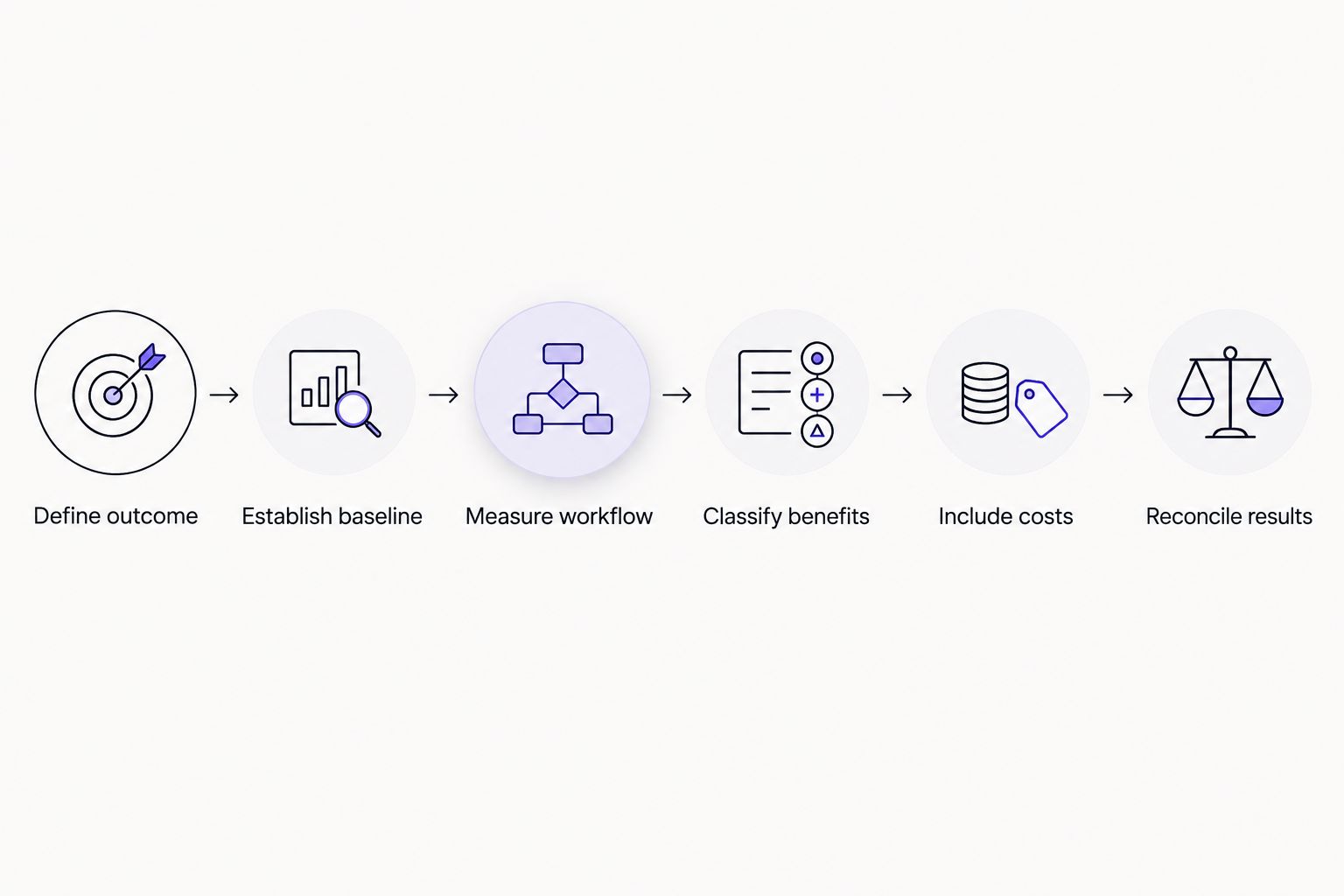
Financial return depends on the completed workflow, including review, rework, and operating costs.
Which benefits belong in the ROI calculation?
Keep financial benefits and operational improvements visible, but separate. Each measure answers a different question, and combining them without checking for overlap inflates the result.
Cash savings
Best for: Verifying reduced expenditure
Evidence to retain: Payroll, overtime, supplier, or other expense records
Main limitation: Recovered time does not automatically reduce spending
Recovered capacity
Best for: Understanding available employee time
Evidence to retain: Handling-time records and reassigned workload
Main limitation: Capacity is not a realized cash benefit by itself
Incremental contribution profit
Best for: Evaluating additional profitable output
Evidence to retain: Attributed transactions and associated variable costs
Main limitation: Attribution requires separating other business changes
Avoided rework
Best for: Measuring the cost of preventable corrections
Evidence to retain: Error records and correction effort
Main limitation: Rework can overlap with handling-time savings
Faster turnaround
Best for: Evaluating service speed
Evidence to retain: Consistent start and completion timestamps
Main limitation: Speed needs a demonstrated financial link to enter ROI
Use cash savings for a cash-return claim and capacity measures for a capacity claim. Neither measure replaces the other.
If reduced handling time already includes fewer corrections, do not add the same correction time again as avoided rework. Likewise, do not count recovered employee hours at their labor value and then count all profit from work performed during those same hours without reconciling the overlap.
Keep service quality beside the financial result. A workflow that reduces expense but fails its acceptance requirements has not met the business objective.
What belongs in total automation cost?
Organize the cost ledger so someone outside the project can reproduce it. Use invoices, internal time records, usage reports, and documented allocation rules rather than an unexplained total.
Implementation costs
Include process mapping, development, integration, testing, security review, training, and launch support where those activities apply. Record internal employee effort as well as outside expenditure.
An agency invoice is not the whole implementation cost when your team also spends time preparing data, approving access, and checking results. Keep those contributions visible.
Operating costs
Include recurring services, model usage, infrastructure, monitoring, maintenance, and human review. Allocate shared costs using a documented method rather than assigning the entire shared bill to whichever project is under review.
Use actual usage for measured ROI. For forecasts, state the workload assumptions and update them when production behavior differs.
Change and exception costs
Track the effort required when business rules, source documents, permissions, or connected systems change. Include work required to investigate failures and restore the normal process.
A 2026 operating report should distinguish routine operation from material changes. That separation helps you see whether the workflow is expensive to run or expensive to adapt.
Why AI workflow automation ROI varies
The formula stays the same. The workflow inputs change the result:
Eligible volume: Count cases the automation can actually handle, not every request entering the department.
Net handling time: Include review, corrections, and escalation before valuing recovered employee time.
Outcome quality: Apply the same acceptance standard to manual and automated work.
Financial conversion: Show whether recovered capacity reduced spending or produced additional contribution profit.
Operating burden: Include monitoring, maintenance, usage, and support effort in the denominator.
Measurement period: Separate launch costs and ramp-up from the ongoing operating view.
Before approving expansion, test the business case against less favorable assumptions for eligible volume, review effort, and operating cost. This is a planning exercise, not measured ROI. Label it accordingly and keep it separate from the actual-results ledger.
How do you prove the automation caused the improvement?
Compare equivalent work under consistent acceptance rules. Where practical, retain a comparable manual group during evaluation or introduce automation in stages so you can distinguish the workflow change from wider operational changes.
Record staffing changes, policy changes, demand shifts, and other projects that affect the same outcome. A faster completion time after deployment does not, by itself, establish that automation caused the entire improvement.
For a 2026 results review, retain the underlying case records and calculation definitions. Someone should be able to trace a claimed benefit back to completed work rather than a presentation slide.
When should you expand an automated workflow?
Expand when completed work meets the required quality standard and verified benefits justify the full cost. Investigate weak results before increasing volume; more activity does not repair an incorrect financial assumption.
Arcgent is best suited to companies seeking an agency to build and maintain custom workflow automation inside their existing software. That service model addresses development and ongoing upkeep, but your business still needs an accountable workflow owner and evidence of financial results.
You can review Arcgent when evaluating that delivery model. Define the acceptance criteria and reporting responsibilities before work starts, not after the first dashboard appears.
Discuss your workflow automation
Bring a repetitive workflow, its baseline, and the business outcome you need to measure.
FAQ
What's the formula for AI workflow automation ROI?
ROI equals verified financial benefits minus total automation costs, divided by total automation costs, multiplied by 100. Use matching measurement periods and include implementation, operation, maintenance, and human oversight.
Does saving employee time count as financial ROI?
Saved employee time counts as recovered capacity unless you verify a financial outcome. Reduced overtime, eliminated expenditure, or attributable additional contribution profit can support a financial benefit claim.
What does 0% ROI mean for workflow automation?
0% ROI means measured financial benefits equal measured costs for the selected period. It does not mean the project meets your investment requirements or outperforms alternative uses of the money.
How is payback different from ROI?
Payback measures when cumulative net cash benefits recover the initial investment, while ROI measures return relative to cost over a defined period. Use cash flows for payback rather than treating unconverted employee capacity as cash.
How should I measure automation that increases revenue?
Measure attributable incremental contribution profit, not total revenue. Account for variable delivery costs and separate the effect of automation from other commercial changes.
What should I measure when working with Arcgent?
Measure the completed workflow, net employee handling time, accepted output quality, financial benefits, and full costs. Arcgent builds and maintains custom agents, while your business must define the outcome and verify its financial value.
Should my 2026 ROI report include forecasts?
Keep forecasts separate from measured 2026 results. Show the assumptions, dates, and financial categories behind each view so projected capacity is not presented as realized savings.
One last thing
Define the benefit owner before defining the dashboard. Every financial claim needs someone who can confirm what changed and where the evidence lives.
Add a short explanation beside each benefit: what happened to the saved time, eliminated expense, or additional output. If nobody can explain that conversion, report the operational improvement without presenting it as realized financial return.