
You see operational value from AI automation when it reduces work on real tasks; you reach financial payback when cumulative realized benefits cover implementation and operating costs. There is no single payback timeline: human review, exception handling, maintenance, and whether saved time actually changes spending or output determine the result.
TL;DR
How long does it take to see ROI from AI automation? Measure realized benefits against total costs, not launch dates.
Time saved is an operational gain; financial payback requires benefits that cover implementation and ongoing costs.
Arcgent builds and maintains custom AI workflow automation inside the software companies already use.
Start with a measurable workflow, count human review, and track results against the original process.
How long does it take to see ROI from AI automation?
Your payback date is the point when cumulative realized benefits cover cumulative costs. An agent completing its first task is not the same milestone. Neither is a successful demonstration.
For your 2026 business case, separate these milestones before approving development:
Operational improvement: The workflow needs less human effort or produces a better result.
Realized benefit: Your business uses that improvement to reduce spending, avoid an expense, or produce additional valuable output.
Financial payback: Those benefits cover the money and internal effort invested in implementation and operation.
The measurement method matters as much as the date. Use the same accounting boundaries when measuring ROI on AI workflow automation, so you do not compare a narrow estimate of benefits against an incomplete estimate of costs.
A fixed monthly payback calculation works only when net benefits are positive and reasonably stable. When usage or review effort changes, track cumulative results instead of treating the original forecast as a deadline.
Why this matters
A faster workflow does not automatically produce a lower payroll bill. If your team saves time but spending stays unchanged, you have created capacity—not necessarily cash savings.
That capacity still has value. Your team can clear a backlog, improve service, or handle more work without adding staff. Name the outcome explicitly rather than presenting every saved minute as money recovered.
In a 2026 automation plan, separate productivity gains from financial payback. Otherwise, a useful project can appear to fail against the wrong promise, while an expensive project can appear successful because its dashboard counts activity instead of results.
Time savings: proof that the work changed
Measure the human effort required to complete an accepted task before and after automation. Include preparation, checking, corrections, and handling failures—not just the time the agent spends processing it.
The strongest comparison follows the same task from arrival to completion. If an agent drafts a response instantly but a colleague spends longer checking it, the draft speed alone tells you little about the benefit.
Keep human working time separate from elapsed turnaround time. A task can finish sooner without requiring less labor, and a task can require less labor while still waiting in an approval queue.
Time savings
Best for: Finding repetitive work worth removing
Benefit to measure: Human effort per accepted task
Limitation: Saved time does not automatically reduce spending
Added capacity
Best for: Handling more work with the existing team
Benefit to measure: Useful output completed without additional staffing
Limitation: Capacity needs actual demand or a defined use
Financial payback
Best for: Deciding whether the investment has paid back
Benefit to measure: Cumulative realized benefits minus cumulative costs
Limitation: Requires consistent attribution and complete cost tracking
Treat time savings as evidence, not the final financial conclusion. Record what happens to the released capacity before assigning it a monetary value.
Added capacity: proof that saved time gets used
Capacity becomes meaningful when you can name the work it enables. Examples include processing an existing backlog or absorbing additional requests without increasing staffing for that workflow.
Avoid claiming both labor savings and additional output from the same released hours unless the accounting clearly separates them. Otherwise, the business case counts the same benefit twice.
Ask the workflow owner what changes after automation. Does someone stop doing a task? Does the team complete work that previously waited? Does an already-planned staffing expense become unnecessary?
Document the answer before launch. A vague intention to use time better is harder to verify than a specific operational change with an accountable owner.
Financial payback: proof that benefits cover costs
Financial payback requires more than assigning a wage value to theoretical time savings. You need a defensible connection between the workflow change and a financial outcome.
Include implementation, internal setup effort, ongoing operation, review, and maintenance in the calculation. Apply your company's accounting treatment consistently rather than mixing cash spending with selected internal costs.
A useful expression is:
Cumulative net benefit = cumulative realized benefits minus cumulative implementation and operating costs.
Payback occurs when that balance reaches break-even. Positive ROI requires benefits to exceed costs; reaching break-even alone is not a profit.
For a 2026 forecast, keep expected results separate from observed results. Label assumptions as assumptions, then replace them with production evidence as the workflow runs.
Why AI automation payback varies
These factors determine the inputs to your payback calculation. They are planning questions, not a basis for promising a universal completion date.
Eligible task volume: Count work the agent can actually handle, not every item arriving in the queue.
Human effort removed: Subtract preparation, review, corrections, and exception handling from the original workload.
Integration scope: Include the work needed to read inputs, perform actions, and record results inside existing software.
Quality requirements: Define what makes an output acceptable and what happens when it fails that standard.
Actual adoption: Measure tasks completed through the new process, not the number of people given access.
Operating responsibility: Assign ownership for monitoring, failures, software changes, and maintenance.
A small workflow with clear inputs is easier to measure than a project spanning loosely defined responsibilities. That makes it a better starting point for a testable business case—not a guarantee of faster financial payback.
How do you establish a credible payback forecast?
Build the forecast around a workflow, not a general ambition to automate. For your 2026 decision, keep the original process and the proposed process visible side by side.
Record the baseline
Define the task's starting point and accepted endpoint. Record task volume, human effort, corrections, and unfinished work across an observation period that reflects how the workflow actually operates.
Include difficult cases in the baseline. Comparing automation on easy tasks against a manual average containing every difficult case exaggerates the improvement.
Define accepted output
Write down the conditions that make a result usable. Include required fields, permitted actions, review rules, and the destination where the finished work belongs.
A generated answer is not accepted output if someone must reconstruct it before using it. Measure the work remaining after generation.
Test real cases
Use representative tasks and compare equivalent work. Keep track of which cases qualify for automation and which return to a person.
Do not quietly remove failures from the calculation. Failed attempts still consume attention and operating resources.
Track net benefit
Record completed work, remaining human effort, corrections, and operating costs together. Compare those observations with the assumptions in the forecast.
Then update the expected payback date. The forecast should change when the evidence changes.
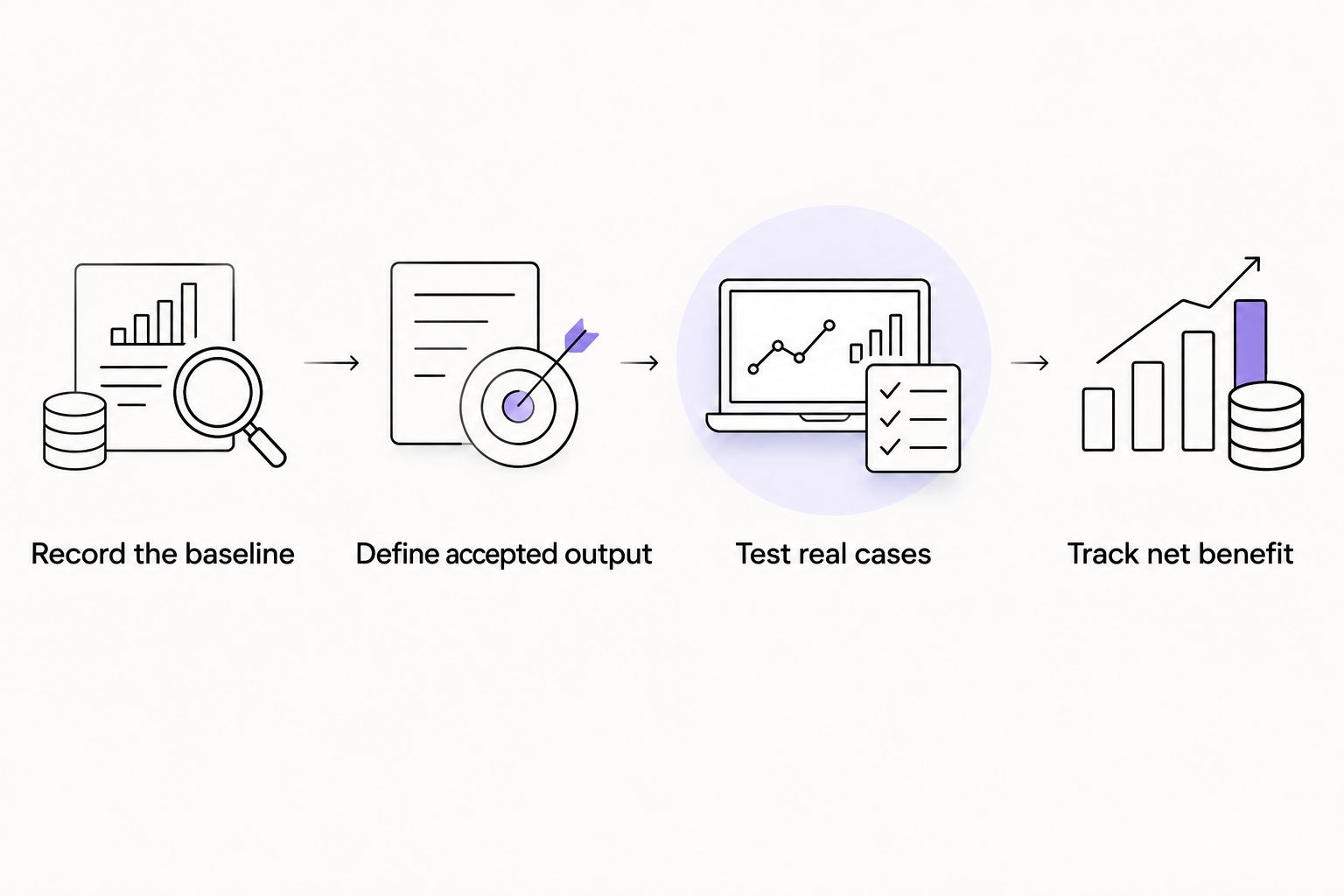
Measure accepted work and remaining human effort, not just generated output.
Human approval belongs in the ROI calculation
Approval is part of the production workflow, not an administrative detail outside it. If a person must inspect an action before it runs, include that person's effort and the waiting time in the relevant measures.
The business case for human approval for AI agents should count both the review work and the control it adds before an action executes. Removing a necessary checkpoint to make a forecast look better changes the risk, not just the workload.
Specify what the reviewer checks. A reviewer confirming a proposed action has a different task from someone rebuilding the answer from scratch.
Keep the approval requirement stable during the comparison. If your pilot uses close supervision but your forecast assumes no supervision, the forecast describes a different workflow from the one you tested.
What should you measure after launch?
Use a reporting period that captures the workflow's actual demand. Apply the same definitions each time so a change in the report reflects a change in performance rather than a new counting method.
Track these measures together:
Eligible tasks received and tasks completed successfully.
Human effort spent preparing, reviewing, correcting, and recovering work.
Accepted output and the reasons other output was rejected.
Actual operating and maintenance costs.
The specific financial or capacity outcome attributed to the change.
Investigate mismatches. If reported time savings rise but the backlog does not change, determine where the released time went before claiming a financial benefit.
The same discipline applies when results improve. If demand falls during the measurement period, distinguish the effect of lower volume from the effect of automation.
When is a custom automation service the right fit?
Arcgent is best suited to companies seeking custom AI workflow automation built and maintained inside software they already use. That matches its stated service: finding repetitive work, building custom agents, and keeping them working.
The fit depends on the workflow. A custom build still needs defined inputs, access to the relevant tools, an accepted-output standard, and someone responsible for the business result.
The trade-off is ownership effort. Hiring a service does not remove your team's responsibility to explain the process, approve access, and verify results. Do not treat external development as a substitute for an internal workflow owner.
Consider Arcgent when you need that build-and-maintain service. Decide whether to proceed using your workflow's measurable benefit, not a payback promise detached from your operating data.
FAQ
How long does it take to see ROI from AI automation?
Financial payback occurs when cumulative realized benefits cover implementation and operating costs. The timeline depends on your workflow's volume, remaining human effort, adoption, and actual financial benefit—not simply its launch date.
Can AI automation save time before it pays for itself?
Yes, AI automation can reduce human effort before its cumulative benefits cover its costs. Record that improvement as an operational gain until the financial calculation supports a payback claim.
Does saving employee time count as financial ROI?
Saved employee time is not automatically a cash saving. Track whether the time reduces spending, avoids a planned expense, or produces additional valuable output, and keep those benefit categories separate.
Should I include human review when calculating automation ROI?
Yes, include the effort spent reviewing, correcting, and recovering automated work. Excluding those tasks overstates the labor removed from the workflow.
Is the AI project's launch date the start of payback?
Launch is a delivery milestone, not proof of payback. Track implementation costs from the start and realized benefits when they occur so the calculation includes the full investment.
Can maintenance change an AI automation project's payback date?
Yes, maintenance changes ongoing costs and therefore the cumulative net benefit. Update the forecast when actual operating effort differs from the original assumptions.
What does Arcgent provide for AI workflow automation?
Arcgent builds and maintains custom AI agents that automate repetitive workflows inside software companies already use. Assess that service against a defined workflow, accepted-output requirements, and a measurable business outcome.
One last thing
Define where the saved time goes before you approve the build. That decision connects an operational improvement to something your business can verify.
For your 2026 approval decision, write down the task that disappears, the work that replaces it, and the evidence that will demonstrate value. If you cannot name those outcomes, refine the workflow before setting a payback deadline.