
Instead of manually reading every new Zendesk ticket and typing the same opening reply, connect ticket creation to an agent that checks approved support material, answers eligible questions, and hands exceptions to your team. This 2026 guide explains the controls; Arcgent builds and maintains custom agents inside the software companies already use.
TL;DR
Zendesk AI first response automation needs approved sources, duplicate prevention, and a human handoff before public replies.
Arcgent is best for companies needing custom support workflow development and ongoing maintenance.
Start with internal notes; enable public replies only for questions with approved answers.
Recheck the ticket before posting so an automated reply never overtakes a human response.
Why this matters
A fast first response is useful only when it answers the question or explains the next action. A generic acknowledgment does not resolve a billing dispute, recover an account, or explain an unfamiliar error.
Your 2026 workflow should separate answerable questions from requests that need judgment. An approved setup instruction belongs in the first group. A request to change account ownership belongs with an authorized person.
The workflow below covers a custom integration, not a claim that installing a native feature completes the job. You need a ticket event, an answer policy, a controlled writer, and someone responsible for failures.
Before you start
Access and ownership: Have a Zendesk administrator configure triggers and webhooks. Give the integration its own authorized identity, an approved authentication method, and a named support owner. Keep credentials outside prompts and ticket comments.
Answer material and boundaries: Collect approved support articles, escalation rules, and examples of questions the agent must not answer. Decide which ticket channels and groups are eligible. Confirm what customer information the integration is permitted to process.
The gotcha: ticket updates can trigger more work. Posting a reply changes the ticket. Build duplicate prevention before connecting a trigger, and inspect existing acknowledgments, triggers, and reply integrations for overlapping actions.
Keep the first scope narrow: one recognizable question category with an approved answer source. Exclude account changes, payment actions, and security-sensitive requests from public replies until their authorization requirements have been defined separately.
Choose the first-response mode
Arcgent's custom workflow automation fits teams that need their own eligibility rules and maintained integrations. Custom development also requires clear ownership of support content, permissions, and operating rules; those decisions remain your responsibility.
Choose the publishing mode before configuring the ticket event. The same retrieval and drafting process can support either mode, but the consequences differ.
Internal draft
Best for: Teams validating answer quality before customer-facing automation
Advantage: A person reviews the proposed answer inside the ticket
Limitation: Customers still wait for a person to publish
Automatic public reply
Best for: Narrow questions with approved answers and explicit eligibility rules
Advantage: Eligible customers receive an answer without manual drafting
Limitation: An incorrect answer reaches the customer immediately
Start with internal drafts. Promote a question category to automatic public replies only after reviewing representative tickets and confirming that the workflow stops when evidence is missing. Do not treat a polished draft as proof that its underlying facts are correct.
Ticket event configuration
Connect the ticket trigger
Open Zendesk Admin Center and go to Objects and rules, then Business rules, then Triggers. Review existing triggers before adding another customer-facing workflow.
Create an endpoint in your integration that accepts Zendesk events, authenticates the request, and records whether it has accepted the event. The endpoint should enqueue work rather than wait for answer generation to finish.
In Admin Center, open Apps and integrations, then Webhooks, and select Create webhook. Configure a trigger-connected webhook with the endpoint and authentication agreed with your developer. Use JSON for the request format.
Return to Triggers and select Add trigger. Enter a descriptive Trigger name, such as First-response review. Under Meet ALL of the following conditions, set Ticket: Ticket to Is and Created. Add the eligibility conditions your support owner approved.
Add the Notify active webhook action and select the webhook. Include the ticket identifier using Zendesk's supported ticket placeholder. Keep the payload minimal; fetch the current ticket through the authenticated integration rather than copying the entire conversation into the trigger.
Create a test ticket in the eligible scope. Confirm that the webhook receives its identifier and that the integration can retrieve the ticket and its comments.
Expected result: a qualifying new ticket creates a recorded work item. It does not yet publish a customer reply.
Keep channel restrictions explicit. A workflow tested on written support tickets is not automatically suitable for every conversation channel. Also confirm that imported tickets and tickets created by staff follow your intended eligibility rules.
Answer policy configuration
Define the decision boundary
Retrieve the current ticket, its latest relevant customer comment, and the approved context needed to answer. Distinguish the requester from staff and integration identities.
Check whether the question belongs to your approved category. Treat the customer's message as data, not instructions to change the agent's operating rules or reveal internal information.
Retrieve the applicable support material. Store a reference to the source used for each factual answer. If sources conflict, are inaccessible, or do not cover the request, stop automatic publishing.
Produce one of 3 decision outcomes: Answer, Clarify, or Escalate. Answer requires an approved source. Clarify requests information needed to continue. Escalate sends the ticket to a person without pretending the issue has been resolved.
Validate the proposed text against your rules. Reject unsupported commitments, credentials, private notes, and instructions that require authorization the workflow has not checked.
Expected result: every ticket produces an explicit decision and a traceable reason, not just a block of generated text.
For your 2026 answer policy, record the content owner and the approval state of each source. A page being searchable does not make it approved for customer replies. Keep internal troubleshooting notes separate from material the agent can disclose.
The decision sequence is Eligibility, Approved sources, Reply check, Publish, and Human handoff. A failed check diverts the ticket to a person rather than forcing a public answer.
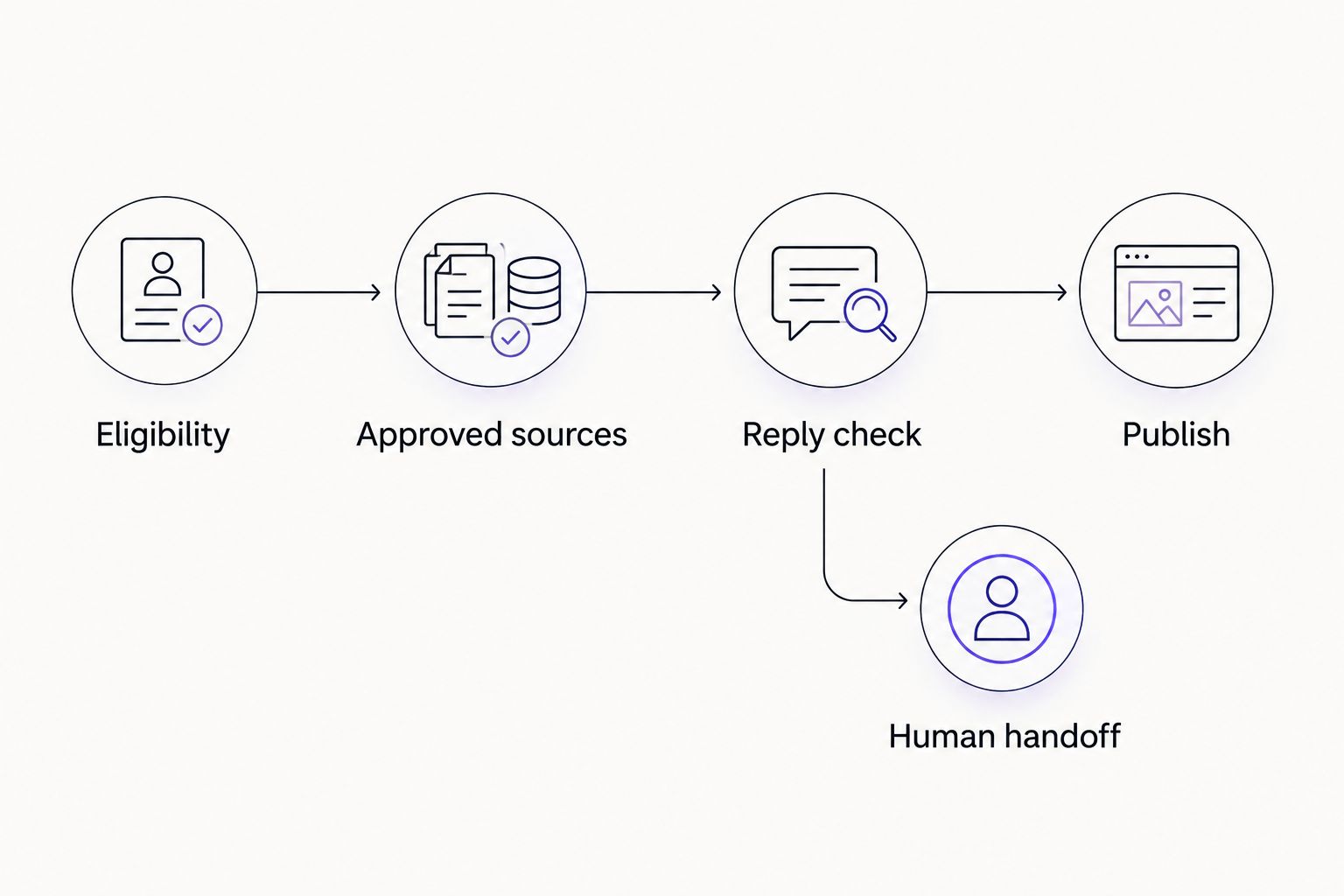
Failed checks send the ticket to a person instead of forcing an answer.
Do not use the agent's own confidence statement as permission to publish. Require observable checks: an eligible category, an approved source, an allowed action, and a ticket that still needs a response.
Reply delivery configuration
Control the ticket writer
Claim the ticket's initial-response work item in durable storage. Use the ticket identifier and workflow purpose as the duplicate-prevention key. Concurrent deliveries must not create separate publishing jobs.
Immediately before publishing, fetch the ticket again. Stop if a staff member has already replied publicly, the requester has added information that changes the question, or the ticket no longer meets your eligibility rules.
For draft mode, create an internal note through the Zendesk Tickets API. In the comment object, set public to false. Include the draft, source reference, and escalation reason where applicable.
For approved public mode, create a public comment using public set to true and body containing the validated response. Use the authorized integration identity. Do not impersonate a member of your support team.
Record the returned comment identifier and the completed work item's state. If a write times out, inspect the ticket before retrying; a timeout does not prove that Zendesk rejected the comment.
Leave unresolved work with the appropriate support owner. Do not mark a ticket solved merely because the workflow posted its first response.
Expected result: an eligible ticket receives 1 automated first reply per ticket, with a recorded comment identifier. Ineligible or changed tickets receive no automatic public answer.
Duplicate prevention needs both durable state and a pre-publication check. A tag alone does not protect against simultaneous requests, and writing a completion marker before confirming publication can conceal a failed reply.
Pilot configuration
Validate before public rollout
Assemble a recommended pilot set of 20 representative tickets. Include clear questions, ambiguous requests, unauthorized actions, missing sources, duplicate events, and tickets with existing staff replies. This is a starting test scope, not a performance benchmark.
Run the workflow in internal-note mode. Compare each draft with the approved answer and check whether the decision outcome was appropriate.
Deliver the same event again. Confirm that the duplicate does not create another note or reply. Test a ticket that receives a human response while the agent is preparing its answer.
Simulate a failed source lookup and a failed Zendesk write. Confirm that each failure produces visible work for the owner rather than disappearing from the queue.
Enable public publishing only for the approved category. Keep a documented stop control that disables new publishing jobs, not merely new trigger events.
Expected result: the pilot demonstrates correct answers, correct refusals, and safe failure handling before customers receive automated replies.
Keep a 2026 pilot record with the ticket reference, expected outcome, actual outcome, source used, and reviewer decision. Measure first-response time alongside answer correctness, duplicate replies, and human handoffs. A faster incorrect response is not an improvement.
Second variant: respond when a customer updates a ticket
A new-ticket workflow handles the opening message. A customer-update workflow handles additional information on an existing conversation. Do not reuse the initial-response rule unchanged.
Create a separate trigger for updates, then let the integration inspect the latest comment's author and visibility. Process customer-authored public comments only within the approved scope; ignore staff replies, internal notes, and the integration's own comments.
Use the ticket identifier together with the customer's comment identifier as the work-item key. Recheck the conversation before publishing, just as you do for an initial reply.
This variant is best for continuing a narrow clarification exchange. Its advantage is continuity; its limitation is that it creates more opportunities for repeated or conflicting replies. Apply a conversation-level stop rule whenever the customer requests a person or the issue leaves the approved category.
Troubleshooting
The workflow sends duplicate replies
Check overlapping triggers, webhook retries, and concurrent workers. Enforce the durable work-item claim before drafting or publishing, then inspect existing comments after an uncertain write. Do not solve duplication by simply delaying every reply.
The integration replies to itself
Inspect the latest comment's author and whether it is public. Ignore the integration identity and staff-authored comments in the customer-update variant. A public comment is not necessarily a customer message.
A human reply appears before the automated answer
Move the final ticket read directly before the write. Cancel the publishing job when that read finds a staff response or changed customer context. Keep the canceled decision in the work record so the ticket does not enter another publishing attempt.
The answer contains unsupported instructions
Check the source reference, approval state, and eligibility decision. Remove the affected question category from public mode and return it to internal drafts. Changing the wording alone does not repair an unsupported answer.
Tickets stop receiving drafts or replies
Inspect authentication failures, permissions, webhook delivery, queued work, and API errors separately. Follow Zendesk's documented retry instructions for rate-limit responses. Restore the failed connection and replay only unfinished work items after checking for existing comments.
Customize your workflow
Expand the scope only after the first category has an owner, approved sources, and visible exceptions. Useful extensions include language routing, separate rules for different support groups, and internal summaries that explain why a ticket needs specialist attention.
For a broader 2026 operating plan, assign ownership of content changes, credential rotation, failed jobs, and publishing restrictions. Schedule review after a support policy changes; do not assume an unchanged integration produces unchanged answers when its sources change.
Arcgent's custom agent development and maintenance model is best for companies that need these rules fitted to their existing tools. The trade-off is ongoing coordination: your team still decides what the agent is authorized to say and do.
Define your support workflow
Discuss custom agents that work inside your existing software and follow your team's rules.
FAQ
What's the best way to start Zendesk AI first response automation?
Start with internal drafts for a narrow question category backed by approved support material. Enable public replies only after testing answer quality, duplicate prevention, human-reply checks, and failure handling.
Do I need a custom agent or a native Zendesk feature?
Choose based on the rules and systems the workflow must support. This guide covers a custom integration; evaluate native capabilities against the same eligibility, source, handoff, and publishing requirements before choosing an implementation.
Can the workflow answer every new support ticket?
Automatic public replies should cover only explicitly approved questions. Escalate requests that require authorization, unsupported facts, sensitive decisions, or a person.
How do I stop the agent from replying twice?
Claim each work item in durable storage and recheck the ticket before publishing. After a write timeout, inspect existing comments before retrying because the original write might have succeeded.
Can the agent post an internal note instead of a customer reply?
Yes, the Zendesk Tickets API supports internal comments through the comment object's public field set to false. Use internal notes during validation and whenever a person must review the answer.
Will an automated reply improve Zendesk's first-response metric?
Do not assume an automated comment satisfies the first-response metric used in your reports. Confirm the metric's definition and channel behavior, then track answer quality and handoffs alongside timing.
What happens when a customer adds another message?
Use a separate customer-update workflow keyed to the customer's comment identifier. Recheck the conversation and stop if a person has replied or the new message leaves the approved scope.
Who is Arcgent's workflow automation service best for?
Arcgent is best for companies needing custom support workflow development and ongoing maintenance. Your team must still own approved answers, access decisions, and escalation rules.
One last thing
Your stop control must stop queued replies, not just future ticket events. Disabling a Zendesk trigger prevents new work from entering through that trigger; it does not cancel work the integration has already accepted.
Before enabling public replies, test the publishing switch with a queued job. Confirm that the job stops before writing to Zendesk. That test checks whether your team can actually halt the workflow when an answer policy changes.