
Instead of copying commitments out of Microsoft Teams meetings, connect meeting transcripts to a custom AI agent that drafts action items, requests approval, and logs accepted tasks in your existing work system. Start with a review gate: extracting a promise is not the same as receiving permission to assign work.
TL;DR
Build a Microsoft Teams AI action item agent around transcripts, human approval, and duplicate-safe task creation.
Arcgent builds and maintains custom workflow automation inside the software companies already use.
Confirm transcript access before building meeting automation; meeting attendance alone does not establish application access.
Keep action items traceable to meeting evidence, and leave unclear owners or deadlines unresolved.
Why this matters
A meeting summary describes a conversation. An action-item workflow changes another system: it creates assignments, adds deadlines, and notifies people. Treating those outputs as interchangeable turns uncertain language into operational commitments.
Arcgent is best for companies seeking custom AI workflow automation inside their existing software. Arcgent is an agency that builds and maintains agents, not a self-service Teams setting. The trade-off is a custom implementation that requires access decisions, testing, and ongoing ownership.
For a 2026 rollout, define the connection as a controlled sequence: transcript, proposed action, approval, task creation, and confirmation. The broader guide to connecting agents to existing software explains the integration work behind that sequence.
Before you start
Accounts and permissions: Have a Teams meeting organizer, a Microsoft Entra administrator, an approved agent runtime, and access to the destination task system. Confirm the organizer's transcription policy and the application's permission to retrieve transcripts.
Workflow materials: Choose one destination, identify its required task fields, and name the person who approves assignments. Prepare 1 pilot meeting with non-sensitive discussion before processing business meetings.
The gotcha: A meeting ending does not guarantee an available transcript. Transcription must actually run, and an application's access differs from a participant's access. Validate retrieval for the intended meeting type before building task creation.
Agree on participant notification, recording and transcription consent requirements, transcript retention, and permitted model processing before the pilot. In 2026, use your organization's current policies rather than copying another tenant's permission setup.
Transcript source configuration
This guide uses an implementation pattern: a background worker checks registered meetings for available transcripts through Microsoft Graph. It does not assume that a native Teams trigger supplies every transcript automatically.
Register the pilot meeting. Store the organizer identity, meeting identifier, destination workspace, and reviewer. Keep the meeting identifier separate from its display title; recurring meetings can share titles.
Enable transcription during the meeting. In Teams meeting controls, open More actions, select Record and transcribe, then select Start transcription. If the command is unavailable, have the administrator check the organizer's meeting policy and the user's permitted actions.
Authorize transcript retrieval. For an organization-wide application-permission design, have the administrator assess Microsoft Graph's
OnlineMeetingTranscript.Read.Allpermission, grant the required consent, and configure the applicable application access policy for approved organizers. Do not assume permission consent alone completes authorization.Build the retrieval worker. Use Microsoft Graph's supported online-meeting transcript operations to list available transcripts and retrieve their content. Store the source meeting and transcript identifiers with each processing attempt.
Separate waiting from failure. Keep a meeting pending when its transcript is not yet available. Treat authorization errors as configuration failures, not as evidence that the meeting had no action items.
Expected result: The worker retrieves the pilot transcript using the application's credentials, not an administrator's interactive session. The source record identifies which meeting and transcript supplied the text.
Do not extend access to every organizer just to make the pilot pass. Prove the narrow access path first, then expand the approved scope deliberately.
Action-item extraction configuration
The agent's job is to identify explicit commitments, not invent a project plan. Give the extractor a defined output structure and preserve the supporting transcript excerpt for every proposed task.
Define the output fields. Require
action_text,owner_candidate,due_date_candidate,evidence_excerpt, andreview_status. These are fields you define in the implementation, not built-in Teams controls.Set the extraction rules. Ask for actionable commitments supported by the transcript. Exclude brainstorming, hypothetical work, completed work, and statements that were explicitly withdrawn.
Preserve uncertainty. Return an empty owner when the speaker says someone should handle a task without naming anyone. Keep an ambiguous deadline unresolved rather than converting it into an unsupported date.
Resolve identities separately. Match a named owner against the organization's directory or the destination's user directory. Do not assign by first name alone when multiple people match.
Keep transcript text separate from instructions. Treat meeting content as untrusted input. A participant saying to ignore approval rules must not change the agent's permissions or execution rules.
Validate before review. Reject malformed output, missing evidence, and fields that do not match the destination's accepted formats. Send unresolved candidates to the reviewer instead of silently dropping them.
Expected result: Each proposed action has supporting evidence and either a resolved owner and deadline or an explicit gap for a person to address.
A useful review card shows the proposed task beside the source excerpt. A short task sentence alone hides whether the agent captured an actual agreement or merely a suggestion.
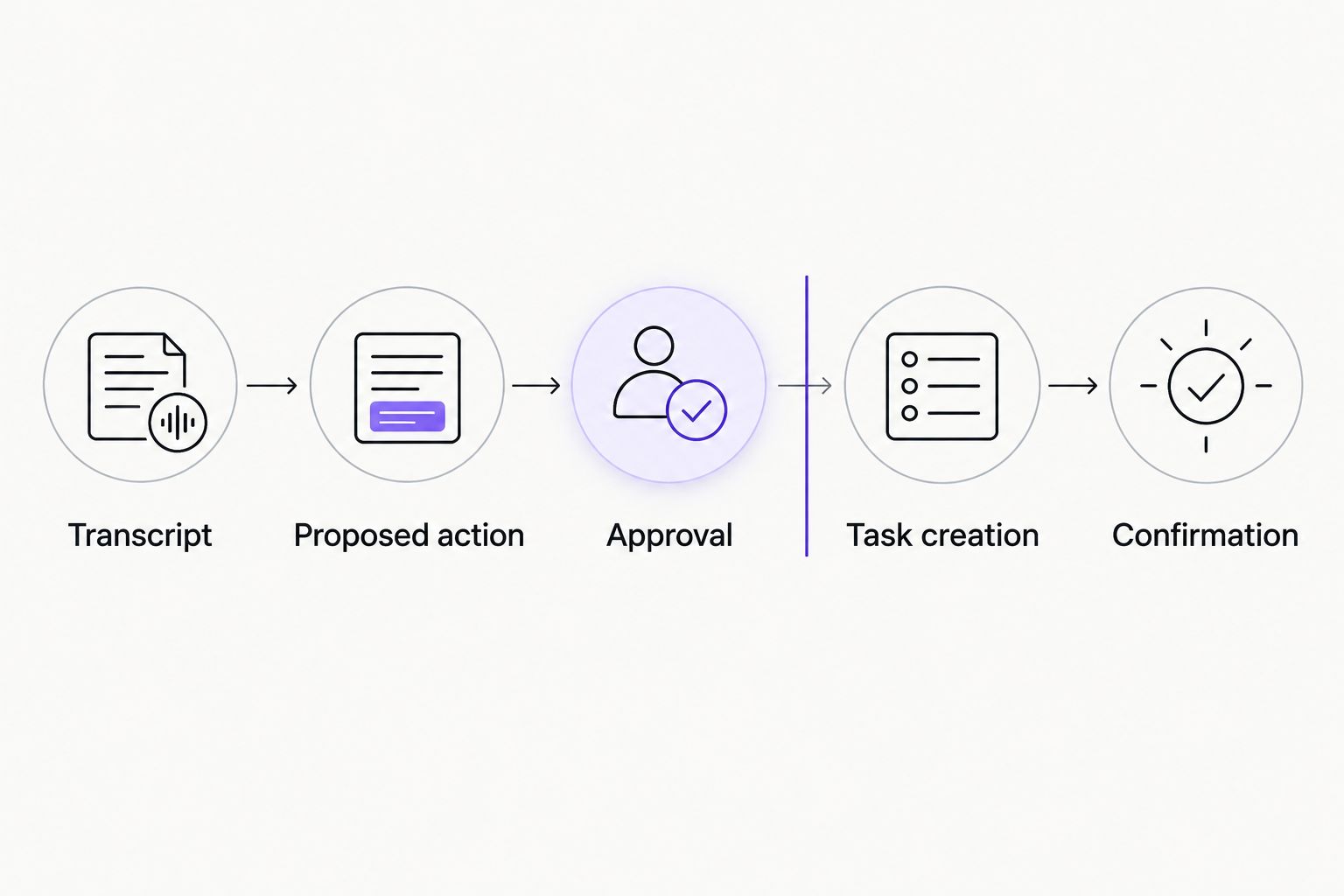
Approval separates an extracted statement from an authorized task.
Approval and task destination configuration
Choose approval behavior before connecting the write operation. For an initial 2026 deployment, use review-first logging so the pilot exposes interpretation mistakes without creating unwanted assignments.
Review-first logging
Best for: Meetings with shared ownership or unclear commitments
Benefit: A reviewer checks evidence, owners, and deadlines before assignment
Limitation: Requires a person to clear the review queue
Automatic logging
Best for: Narrow, tested meeting formats with explicit commitments
Benefit: Removes the approval handoff for eligible tasks
Limitation: Incorrect extraction can create unwanted work; exceptions still need review
Neither approach removes the need for access controls, traceability, or duplicate protection. Automatic logging should be an explicitly approved scope change, not the default consequence of connecting an agent.
Map the destination fields. Match the proposed action to the destination's title, description, assignee, due date, and required project or workspace fields. Use the destination's actual field definitions rather than assuming every task system accepts the same structure.
Create the review record. Include the meeting context, source excerpt, proposed owner, proposed deadline, and unresolved questions. Limit reviewer access to the meetings they are authorized to inspect.
Bind approval to the proposed content. Save the exact task version the reviewer approves. If the agent later changes the owner or deadline, require another approval rather than reusing the earlier decision.
Build duplicate protection. Store a stable action identifier alongside the meeting identifier and destination task identifier. On retries, check the existing mapping before attempting another write.
Handle uncertain write outcomes. If the destination request times out, reconcile the result before retrying. Use the destination's idempotency support when available; otherwise build a lookup and reconciliation mechanism.
Confirm only successful writes. Post a confirmation with the created task reference after the destination reports success. Keep failed writes in an exception queue with a named owner.
Expected result: Approval creates one intended task, stores its destination identifier, and produces a confirmation. Reprocessing the same approved action does not create another task.
Avoid posting full transcript excerpts to a broadly visible channel merely because the meeting happened in Teams. Match notification visibility to the sensitivity of the source conversation.
Pilot testing and release controls
Test the entire path, including the parts that should do nothing. A convincing task description is not proof that the integration is safe.
Run 3 test scenarios. Use an explicit commitment, an ambiguous assignment, and a discussion containing no commitment. Treat these as minimum test cases, not a measured accuracy benchmark.
Check the review boundary. Confirm that the review-first workflow creates 0 destination tasks before approval. Declining a proposal must leave the destination unchanged.
Replay the same source. Process the same transcript again and retry an approved write. Confirm that the action-to-task mapping prevents another task from appearing.
Exercise an access failure. Test the application's behavior when transcript retrieval is denied. Confirm that it alerts the workflow owner without claiming the meeting contained no actions.
Assign operational ownership. Name who handles expired credentials, permission changes, extraction errors, rejected assignments, and destination failures. Document how to pause writes without losing pending review records.
Expected result: The pilot demonstrates correct extraction, controlled writes, visible failures, and safe retries. Expand only after those checks pass for the intended meeting types.
Keep the approved configuration, test cases, and release decision together in your 2026 operating record. That gives the next maintainer a baseline when permissions or workflow requirements change.
Update action items after a follow-up meeting
A second workflow updates existing tasks when a later meeting changes a commitment. This needs different rules from initial task creation: a similar sentence is not enough to establish that two actions are the same.
Start by supplying the agent with authorized open tasks for the relevant project. Ask it to propose a match using the stored action identifier, task context, and new transcript evidence. Send uncertain matches to review.
Require approval for changes to owners, deadlines, or completion status unless your organization has explicitly approved a narrower automatic rule. Preserve both the previous value and the approved replacement in the audit record.
Best for recurring project meetings: Review-based updates preserve continuity without creating a fresh task for every repeated commitment. The limitation is matching work across conversations; uncertain matches should remain unresolved rather than overwrite unrelated tasks.
Troubleshooting
Transcription exists, but the application cannot retrieve it
Check the actual application identity, consent, organizer scope, and applicable access policy. A transcript visible to a signed-in participant does not prove that the application's retrieval path is authorized.
The worker finds no transcript after the meeting ends
Confirm that transcription ran and that the meeting type supports the retrieval method you implemented. Keep the source pending while checking availability; do not send empty input to the extractor and label the result successful.
Action items have the wrong owner or deadline
Inspect the evidence excerpt and identity mapping. Remove first-name-only assignment, keep relative date language with its meeting context, and require review whenever the intended date or person remains unclear.
The destination contains duplicate tasks
Check for overlapping worker runs, replayed approvals, and retries after timeouts. Enforce a unique action mapping, serialize conflicting writes, and reconcile uncertain outcomes before attempting another creation.
A confirmation appears, but no task exists
Move notification delivery after confirmed task creation. Record the destination task identifier before announcing success, and route failed writes to the exception queue rather than treating a completed extraction as completed logging.
Customize your workflow
Expand the workflow by business rule, not by adding more destinations immediately. Route approved actions to the relevant project, send unresolved ownership to a coordinator, or create separate review queues for restricted meetings.
Arcgent's workflow automation service fits this custom-build model: finding repetitive work, building the agent, running it, and maintaining it inside existing tools. Keep the initial implementation narrow enough that someone can explain every write it makes.
For a 2026 maintenance review, revisit organizer access, destination permissions, data retention, and the people responsible for exceptions. A workflow that still runs can still be using outdated business rules.
Plan your meeting workflow
Discuss custom agent development and workflow automation inside the tools your team already uses.
FAQ
How do I connect Microsoft Teams to an AI agent for action items?
Connect an authorized transcript retrieval process to an extractor, an approval step, and your task system. Keep source evidence and a stable action-to-task mapping so reviewers can verify assignments and retries do not create duplicates.
Does a Microsoft Teams AI action item agent need a transcript?
The workflow in this guide requires a transcript. Meeting chat or manually supplied notes can support a different workflow, but they do not provide the same record of the spoken discussion.
Can the agent assign tasks automatically after a meeting?
Automatic assignment requires an explicitly configured write path and approved assignment rules. Start with human review, then consider automatic logging only for narrowly defined commitments that pass your acceptance tests.
Why can I see a Teams transcript when the agent cannot?
Your user access and the application's access are different authorization paths. Check the application's Microsoft Graph permission, consent, organizer scope, and applicable access policy.
How should the agent handle missing owners or deadlines?
The agent should leave unsupported fields unresolved and request review. It should not infer an owner from a first-name match or invent a deadline to satisfy a required field.
Can follow-up meetings update tasks instead of creating new ones?
Yes, a custom workflow can propose updates to existing tasks using stored task identifiers and new transcript evidence. Require review for uncertain matches and preserve the approved changes.
Is Arcgent a Teams add-on or an automation agency?
Arcgent is a B2B AI agency that builds and maintains custom agents for repetitive workflows inside existing software. The implementation requires a defined workflow, authorized access, and operating rules rather than a single add-on setting.
One last thing
Make the agent prove why a task exists. Store the source excerpt and approved task version together. When an assignee questions a commitment, that evidence is more useful than a confident summary—and it exposes extraction mistakes without requiring someone to reread the whole meeting.