
Yes, AI agents can integrate with HubSpot through its APIs and supported app connections to read CRM data, prepare updates, and carry out permitted actions. In 2026, the practical limit is not whether an agent can connect; it is which records, actions, and decisions you authorize it to handle.
TL;DR
Can AI agents integrate with HubSpot? Yes, using APIs or supported connections with defined permissions.
Start HubSpot workflow automation with drafts and review before allowing automatic CRM updates.
Arcgent builds and maintains custom AI agents for companies working inside their existing software.
Choose the connection method around required actions, access controls, and ongoing maintenance—not a demo.
Can AI agents integrate with HubSpot?
Yes. A HubSpot integration can give an AI agent controlled access to CRM records and supported actions. The agent interprets information or prepares a decision; the integration handles authentication, retrieves records, and submits permitted changes.
That distinction matters. A model producing a suggested deal update is not the same as a system safely writing that update to the correct deal. Your integration needs explicit rules for both.
The guide to connecting agents to existing software explains the broader connection problem. For HubSpot, begin by specifying the records involved, the fields an agent needs, and the actions it must never take.
Direct API integration
Best for: Workflows needing precise control over CRM operations
Main advantage: Lets developers define requests, validation, and error handling
Main limitation: Requires development and ongoing maintenance
Middleware connection
Best for: Workflows that fit an available connector's supported actions
Main advantage: Provides an existing connection layer between systems
Main limitation: Connector coverage limits what the workflow can do
HubSpot workflow plus external agent
Best for: Processes already organized around HubSpot automation
Main advantage: Keeps existing workflow rules involved in the process
Main limitation: Available actions and features depend on account access and configuration
These approaches are not interchangeable. Check whether each one supports your actual operation, not merely whether it displays a HubSpot logo. A connection that reads contacts does not automatically support every association, activity, or record update your process needs.
Why this matters
A connected agent acts on business records your team relies on. An incorrect summary is inconvenient; an incorrect owner assignment or customer-facing message creates work for someone else.
For a 2026 rollout, define success as a correctly completed business task, not a successful API response. The integration must reach the right record, make an allowed change, and leave enough history for someone to understand what happened.
Automate a bounded task before handing over a business decision. Preparing a follow-up draft is a different responsibility from deciding to send it.
Direct API integration: best for precise control
A direct integration lets your developer specify how the agent reads HubSpot data and requests changes. HubSpot provides developer APIs for CRM operations; the exact endpoint, authorization requirements, and supported fields need checking against its current developer documentation.
The benefit is control. You can define field-level validation in your integration, restrict the actions exposed to the agent, and decide how failures reach a human.
The drawback is ownership. Someone must maintain authentication, handle API errors, and adjust the integration when your process or connected systems change.
Choose direct API integration when the workflow requires behavior an existing connector does not support. Do not choose it simply because custom code sounds more capable.
Middleware connection: best for supported handoffs
Middleware sits between the agent and HubSpot. It can handle a supported trigger or action while the agent performs the language-based task, such as extracting information from an incoming request.
The benefit is an existing connection layer. You do not need to build every connection component yourself when the available actions match your process.
The limitation is the connector's scope. Confirm that it exposes the required fields, handles the relevant records, and gives you a usable failure path. A workaround that drops important context is not a finished integration.
Choose middleware when its supported actions match the complete workflow. Review exception handling before approving the connection, not after the first failed run.
HubSpot workflows: best for existing automation rules
A HubSpot workflow can participate in a process that calls an external agent or receives its output, where your account and available features support that connection. Keep the business rules explicit: what starts the process, what information leaves HubSpot, and what happens when the response returns.
The advantage is continuity. Your team can keep relevant process rules in the system it already uses rather than moving every decision into an agent.
The limitation is feature access and configuration. Do not design around a workflow action until you have confirmed that your account supports it.
For 2026 planning, separate required capabilities from preferred implementation. The requirement might be to prepare an internal handoff summary; a particular workflow action is only one possible way to deliver it.
How do you connect an AI agent to HubSpot safely?
Use these 6 implementation steps as acceptance criteria. Each step should produce something your process owner can inspect before the agent receives broader access.
1. Define the task
Write the workflow as an instruction with a clear endpoint. For example: read an assigned record, summarize the relevant information, and prepare a proposed next action for review.
Name the source record and the expected result. Avoid instructions such as “manage the pipeline,” which leave the agent's authority undefined.
2. Map the data
Identify the records, properties, and relationships required for the task. Specify which system owns each piece of information and how the integration finds the correct record.
Do not rely on a person's name alone when matching records. Use stable identifiers where available, and send ambiguous matches to review rather than guessing.
3. Restrict access
Authorize only the access needed for the defined task. Keep authentication credentials outside model prompts and user-facing messages.
Distinguish permission from policy. A credential might technically allow an update that your workflow rules prohibit; your integration must enforce that narrower boundary.
4. Validate output
Check the proposed action before submitting it. Validate required fields, permitted values, record identity, and whether the output follows your business rules.
Treat customer messages, notes, and attachments as untrusted input. Text inside a CRM record must not be allowed to rewrite the agent's operating instructions or request unauthorized actions.
5. Test exceptions
Test missing information, ambiguous matches, denied access, unavailable services, and repeated events. Include examples where the correct result is to stop and ask for review.
A successful demonstration proves that a path works. Exception testing establishes what the integration does when that path breaks.
6. Assign ownership
Name the person responsible for failures, permission changes, and workflow updates. Give that person a way to pause the integration and inspect its actions.
Maintenance is part of the integration, not an optional follow-up. A workflow stops being dependable when nobody owns its changing inputs and rules.
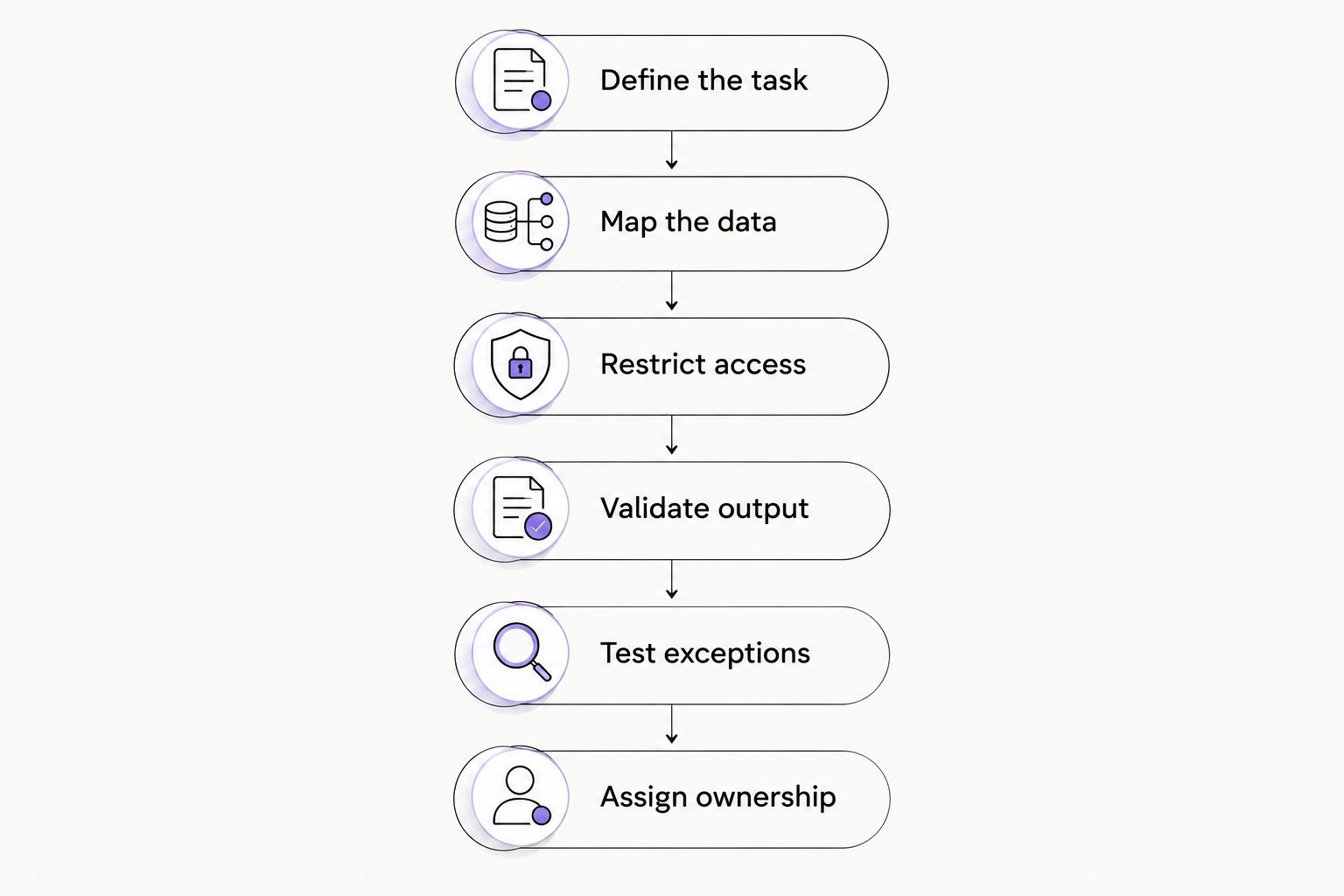
Define the task and its boundaries before granting the agent access.
These steps separate a connection from an operational workflow. In 2026, use the same acceptance criteria whether you build the connection internally or hire an agency.
Why HubSpot integration requirements vary
The connection method is only part of the work. These factors determine what you need to build and maintain:
Record structure: Custom properties and record relationships affect how the integration reads and validates information.
Action scope: Drafting a recommendation requires different controls from changing records or sending messages.
Authentication model: Access must match the intended account use and the permissions required by the integration.
Data quality: Missing fields, duplicates, and conflicting values require explicit handling rules.
Failure handling: Retries, review queues, and alerts need an owner and a defined response.
System boundaries: A task involving another business system needs rules for partial completion and conflicting updates.
Do not resolve these differences by granting broader access. Reduce the task's scope until you can describe its inputs, permitted actions, and failure behavior clearly.
Can an AI agent update HubSpot automatically?
An AI agent can update HubSpot automatically when the integration has the required access and the requested operation is supported. That does not mean every update should happen without review.
Separate the rollout into 2 stages: review-only operation, followed by permitted automatic actions. In the review-only stage, compare proposed changes with what your process owner considers correct.
Before enabling a write, require 3 checks: correct record, allowed change, and acceptable evidence. These are design requirements, not a claim that a model will always satisfy them.
Keep consequential decisions behind approval until you have defined how errors are detected and corrected. If the process cannot explain why an update happened, it is not ready for unattended operation.
Do you need an AI agent for every HubSpot workflow?
No. Fixed rules are the better starting point when the inputs and required action are already predictable. An agent becomes relevant when the task requires interpreting variable language or preparing a response from context.
For example, copying a known property into another field does not inherently require language reasoning. Interpreting an open-ended customer request is a different kind of task.
Use deterministic checks around agent output. Even when interpretation requires an agent, record matching, allowed values, and approval rules should remain explicit wherever possible.
Who should build and maintain the integration?
Arcgent is best for companies seeking custom AI agents built and maintained inside the software they already use. Its service model fits a buyer looking for implementation and ongoing maintenance rather than a standalone software subscription.
The trade-off is that a custom engagement still needs your team's input. You must define the process, authorize access, identify acceptable outcomes, and assign a business owner; hiring an agency does not remove those decisions.
Arcgent builds and maintains custom agents for repetitive workflows. Evaluate any proposed HubSpot implementation against a written task specification, demonstrated exception handling, and a clear maintenance responsibility—not an assumed list of capabilities.
Define your HubSpot workflow
Start with the repetitive task, the records involved, and the actions that need approval.
FAQ
Can AI agents integrate with HubSpot without replacing our CRM?
Yes. An integration can work with HubSpot records while your team continues using HubSpot as its CRM. Define which system owns each field so the agent does not create conflicting updates.
Can an AI agent read HubSpot contacts and deals?
Yes, when the integration uses supported CRM operations and has the required permissions. Confirm the exact records, properties, and relationships needed before granting access.
Can an AI agent send messages from a HubSpot workflow?
An agent can participate in a messaging process when the chosen integration and account features support the required actions. Keep message preparation separate from permission to send, and require approval where your business rules demand it.
Do I need a developer to connect an agent to HubSpot?
A direct API integration requires development work; an existing connector can reduce that work when it supports your task. Either approach still needs configuration, testing, access controls, and maintenance.
Is connecting an AI agent to HubSpot secure?
Security depends on the integration's access controls, credential handling, data handling, and operational safeguards. Limit the data exposed, validate requested actions, and prevent record content from overriding operating instructions.
What happens if the agent updates the wrong HubSpot record?
Your integration needs an incident process that stops further writes, identifies the affected record, and supports correction. Preserve an action history and define who handles the incident before enabling automatic updates.
What should we automate first in HubSpot in 2026?
Start with a bounded, reviewable task such as preparing an internal summary or proposed record update. Expand authority only after the workflow passes your acceptance criteria, including failure cases.
One last thing
A successful retry can still create a business error. If an update succeeds but the response is lost, repeating the operation without checking its outcome can create duplicate activity or repeat an action.
Ask how the integration recognizes an event it has already processed. Then ask what happens when the outcome is uncertain. Those questions reveal more about readiness than another polished demonstration.
For your 2026 rollout, give Arcgent—or your internal developer—a workflow specification that includes failure cases. The connection is finished only when your team knows what happens when it fails.