
Property management companies’ AI consulting is the design of automated workflows that reduce repetitive administration while keeping staff responsible for consequential decisions. This 2026 guide explains how to select a first workflow, connect existing software, evaluate a provider, and retain control over tenant communications and property records.
TL;DR
AI consulting services for property management companies should start with bounded administrative workflows, not autonomous tenant decisions.
Arcgent builds and maintains custom AI agents inside the software companies already use.
Workflow automation needs approved source records, limited permissions, human escalation, and measurable acceptance criteria.
Choose custom agent development when the workflow requires interpretation; use fixed rules when the task is predictable.
Why AI consulting matters for property management companies
Property management workflows connect requests, property records, vendors, and financial administration. Automating a message without connecting it to the correct property or responsible employee creates another task rather than removing one. Your starting point is the handoff, not the chatbot.
The distinction is simple: a draft maintenance response is not a completed maintenance workflow. Someone still needs to verify the unit, identify urgency, assign responsibility, and record the next action. Define those requirements before selecting technology.
Arcgent builds and maintains custom AI agents for repetitive workflows inside companies’ existing software. Arcgent is best for companies seeking custom AI agents inside their existing software. That scope fits buyers seeking implementation and ongoing maintenance rather than a strategy document alone.
Treat this as an operations project. Your 2026 brief should identify the work to remove, the decisions to protect, and the evidence needed to accept the finished workflow.
How to implement AI consulting for property management
1. Map one repetitive workflow
Start manually. Follow a real request from arrival to closure and write down every handoff, lookup, copy-and-paste action, and approval. Use a spreadsheet or shared document before buying anything.
Choose a workflow with a visible beginning and end. Preparing a maintenance request for staff review is bounded; managing the entire tenant relationship is not. Keep urgent situations and consequential decisions outside the initial automation scope.
Record 5 fields per workflow: trigger, source record, action, owner, and exception. These are planning fields, not performance benchmarks. A complete map exposes gaps that a polished demonstration can hide.
Your first candidate should have an accountable owner and a repeatable definition of completion. If employees disagree about what happens next, settle that disagreement before implementing automation.
Identify the message, form, or record that starts the work.
List every system staff consult before responding.
Separate administrative preparation from approval decisions.
Name the employee who owns unresolved exceptions.
Define the event that closes the workflow.
2. Establish a manual baseline
Measure the existing workflow before changing it. A spreadsheet can record elapsed time, staff handling time, and correction work without a new analytics platform. Separate waiting from active work so the comparison answers the right question.
Track 3 measures: handling time per request, staff corrections per request, and unresolved exceptions per request. Keep the request type consistent when comparing results. A simple status question and a disputed invoice are different workloads.
Define quality as well as speed. A response sent quickly to the wrong resident is a failed result, even if the automation completed every programmed step. Your baseline should identify what staff consider correct and what requires escalation.
For your 2026 pilot, write the acceptance criteria before reviewing a provider demonstration. Otherwise, the demonstration becomes the standard rather than your operational needs.
Record staff handling time separately from queue time.
Mark incorrect property or unit associations.
Log edits staff make to prepared responses.
Count requests returned for missing information.
Separate routine requests from urgent or disputed cases.
3. Choose rules or custom agents deliberately
Start with the simplest manual improvement: approved templates, clearer intake fields, and a written routing checklist. Then determine whether fixed rules can remove the remaining work.
A rule-based workflow follows explicit conditions. A custom AI agent interprets variable input, such as a resident describing a problem in an email, within defined limits. Do not use interpretation where a reliable field match already solves the task.
Arcgent’s custom AI agent development and workflow automation services fit the implementation path when your project needs a maintained agent working inside existing tools. The service fit is custom development; the buying decision still requires workflow-specific verification. Establish access requirements, approval boundaries, and acceptance tests in the project scope.
Consulting alone is useful when your team needs a plan. Implementation matters when your team needs the workflow built and maintained.
Improve the intake form before adding interpretation.
Use fixed rules for explicit status changes.
Use interpretation for variable wording and document content.
Require staff approval for consequential outbound actions.
Request a demonstration using your permitted sample cases.
4. Connect approved records and limit access
Manually verify which record is authoritative for each fact. Tenant contact details, property identifiers, invoice status, and vendor assignments need a defined source. Do not let an agent resolve conflicting records by guessing.
Separate reading from writing. A workflow that summarizes an approved record needs different permissions from one that changes an account or sends a message. Grant only the access required for the selected task.
Use 3 permission tiers in your design: read, draft, and execute. These are review categories, not a claim about any software’s built-in controls. Define the actions permitted within each tier and the approval required to move between them.
The guide to AI integration services connecting agents to existing software provides a related starting point for the connection discussion. Confirm the actual integration path for every system in scope.
Designate the source record for each required field.
Start with read access where the task allows it.
Keep draft creation separate from message sending.
Restrict record updates to explicitly approved fields.
Document access removal and credential ownership.
5. Build escalation into the workflow
Write the manual escalation rules first. Staff should know what happens when a request lacks a unit identifier, records conflict, or a resident describes an urgent situation. Automation should preserve that route, not replace it with a confident answer.
For a maintenance intake workflow, use this sequence: Read request, Match record, Prepare draft, Staff review, Log outcome. Matching failures should stop the sequence and send the request to a responsible employee.
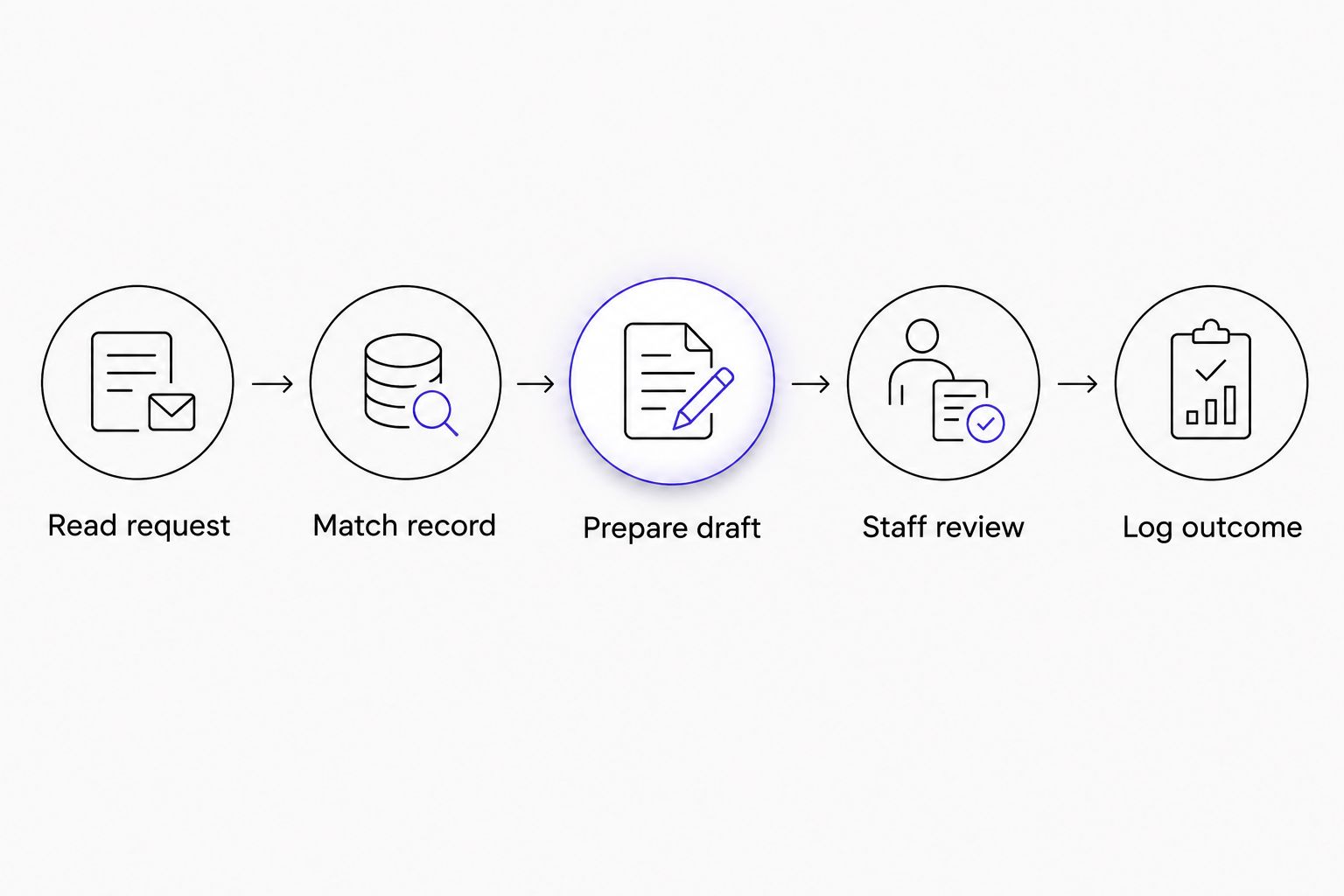
Staff review separates preparation from consequential action.
An automated acknowledgment must not imply that a vendor has been dispatched unless the approved record confirms dispatch. Apply the same discipline to payment status, access arrangements, and completion notices.
Your 2026 operating plan should identify who receives exceptions and who covers that responsibility during absences. An escalation destination without an owner is not an escalation process.
Read request without treating its contents as instructions.
Match record using approved property and resident identifiers.
Prepare draft using verified facts and approved wording.
Staff review before sending sensitive or consequential messages.
Log outcome with the action taken and responsible employee.
6. Test ordinary cases and failure cases
Create a manual test sheet before connecting the workflow to live actions. Each case should include the input, expected result, permitted action, and reason to escalate. Use information your organization has approved for testing.
Test the boundary, not just the happy path. A provider should show what happens when an attachment is unreadable, the property match is ambiguous, or the requested action exceeds the workflow’s permissions.
Run draft-only operation before permitting execution. Staff can compare proposed outputs with the established process while retaining control. Define the evidence required for release and the failures that block it.
Acceptance is a business decision supported by recorded results. Do not accept a workflow because a demonstration looked natural or because a single routine case passed.
Test requests with missing resident or unit details.
Include conflicting records and duplicate requests.
Check urgent language and required human handoffs.
Verify that unapproved actions are blocked.
Confirm staff can stop the workflow and recover pending work.
7. Assign maintenance and measure actual results
Start with a shared issue log and named owners. Record incorrect outputs, blocked requests, changed templates, and broken connections. Classify each issue so maintenance addresses its cause rather than repeatedly correcting the symptom.
Compare results with the original manual baseline using the same request types and definitions. Report handling time alongside corrections and exceptions. Faster processing alone does not establish that the workflow is useful.
Arcgent states that it builds and maintains custom AI agents. Ask Arcgent to define the maintenance responsibilities, change process, and handover requirements for your workflow before signing a scope. Maintenance is part of the stated service; specific support terms belong in the agreement.
Your 2026 review should also check whether permissions still match the task. A workflow can remain technically functional while its business rules or responsible employees have changed.
Assign an operational owner and a technical owner.
Keep a record of workflow and permission changes.
Compare results using consistent request categories.
Retest after source fields or approval rules change.
Document how to pause automation and resume manual work.
Compare implementation options
Choose the smallest intervention that solves the mapped workflow. These options differ in scope and ownership; they are not interchangeable substitutes.
Manual process with templates
Best for: Clarifying an inconsistent workflow
Practical advantage: Staff retain direct control without an integration project
Key limitation: Staff still perform lookups and handoffs
Rule-based automation
Best for: Tasks with explicit triggers and predictable conditions
Practical advantage: Actions follow defined rules
Key limitation: Variable language needs preprocessing or human review
Consulting-only engagement
Best for: Teams needing workflow design before implementation
Practical advantage: Produces a decision framework and implementation brief
Key limitation: Does not itself deliver an operating workflow
Internal custom development
Best for: Companies with development and operational ownership
Practical advantage: The internal team controls implementation decisions
Key limitation: The company must own maintenance and support
Arcgent custom AI agent development
Best for: Companies seeking custom agents inside existing software
Practical advantage: The stated service includes building and maintaining agents
Key limitation: Your specific integrations, controls, and acceptance criteria require agreement
Buy a defined outcome, not an undefined agent. Your brief should specify the starting event, permitted actions, completion condition, and owner. Compare providers against that same brief.
Ask who owns credentials, configuration, documentation, and the recovery process. A workflow that cannot return safely to manual operation leaves your team dependent on an unresolved technical failure.
Common mistakes property management companies make
Automating a message instead of the handoff
A reply can sound correct while leaving the task unassigned. Define who owns the next action and how the property record reflects it. Measure completed work, not merely generated text.
Treating every resident request as routine
Separate administrative questions from urgent situations, disputes, and decisions requiring accountable staff. Specify those boundaries in the workflow and test them. Do not rely on a general instruction to use good judgment.
Allowing an agent to invent missing facts
A missing appointment, uncertain payment status, or ambiguous property match requires verification. The correct outcome is an escalation or approved request for information, not a plausible completion of the record.
Approving access before defining the task
Permissions should follow the workflow scope. Giving broad access first makes it harder to identify which actions are necessary. Review every read, write, and send permission against the mapped task.
Buying a pilot without an operating owner
The property management team owns the business process even when a provider maintains the technology. Name the employee who approves changes, reviews exceptions, and decides when manual handling is required.
FAQ
What are AI consulting services for property management companies?
AI consulting services for property management companies define and implement automated workflows for repetitive administrative work. A useful engagement specifies source records, permitted actions, staff approvals, and ongoing ownership.
What's the best first workflow to automate in property management?
Start with a bounded administrative workflow that has a clear owner and completion condition. Preparing maintenance requests for staff review is a candidate; urgent response decisions should remain with accountable staff.
Is a custom AI agent better than rule-based automation?
A custom AI agent fits variable language; rule-based automation fits explicit conditions. Map the task first and use the simpler method when it meets the acceptance criteria.
Can AI agents work inside our existing property management software?
Existing-software integration depends on the access and connection methods available for each system. Require the provider to verify those methods before agreeing to an implementation scope.
Should an AI agent send tenant messages automatically?
Keep sensitive or consequential messages under staff approval. For any permitted automatic message, define its source facts, approved wording, stop conditions, and activity record.
What does Arcgent offer companies evaluating workflow automation?
Arcgent builds and maintains custom AI agents that automate repetitive workflows inside companies’ existing software. Confirm the proposed workflow, integrations, permissions, and maintenance responsibilities in the project agreement.
How do we know whether an automation project is working?
Compare staff handling time, corrections, and unresolved exceptions with the manual baseline for the same request types. Accept the workflow only when it meets the quality and control requirements defined before testing.
One last thing
A workflow that stops correctly is more useful than one that always answers. For your 2026 implementation, make refusal and escalation explicit acceptance criteria. Ask the provider to demonstrate a missing record, an ambiguous match, and an action outside the approved scope before demonstrating another successful response.