
AI workflow automation saves a business the value of manual work it removes, minus the work and expense needed to run it; there is no single savings figure that applies to every company in 2026. Count human review, exception handling, maintenance, and implementation before treating recovered hours as a financial return.
TL;DR
How much does AI workflow automation save a business? Calculate recovered labor value, then subtract implementation and operating costs.
Recovered hours create capacity; they become cash savings only when spending actually falls.
Arcgent builds and maintains custom AI agents for businesses automating repetitive workflows inside existing software.
Approve expansion only after completed work meets your quality standard and produces a positive net return.
Why this matters
A task finishing faster does not automatically lower your expenses. If employees spend the recovered time on other work, you have gained capacity, not reduced payroll.
Separate time saved, cash saved, and additional output. These outcomes support different business decisions. Combining them into a single savings claim makes an automation proposal harder to judge.
Arcgent builds and maintains custom agents for repetitive business workflows inside the software companies already use. Evaluate that service against a defined workflow and measurable outcome, not a general promise to automate your business.
How much does AI workflow automation save a business?
Calculate savings from your own workload, handling time, labor costs, and operating expenses. Use the same measurement period throughout, and compare completed work at the same quality standard.
Start with this calculation:
Net labor hours recovered = baseline manual hours − remaining human hours.
Remaining human hours include approvals, corrections, exception handling, and oversight. Removing data entry while adding equally time-consuming review produces no net time saving.
Then calculate the financial result:
Net financial benefit = recovered labor value + other verified benefits − implementation and operating costs.
Recovered labor value is the value of staff capacity released. Keep that amount separate from actual reductions in spending unless the business takes a specific action that lowers expenses.
Net labor hours recovered
What to record: Manual hours before and after automation
What it tells you: Capacity released by the workflow
Main limitation: Does not establish cash savings
Cash savings
What to record: Expenses actually removed
What it tells you: Direct effect on business spending
Main limitation: Requires a real spending change
Additional output
What to record: Accepted work completed with existing staff
What it tells you: Capacity converted into useful work
Main limitation: Output is not automatically revenue
Net financial benefit
What to record: Verified benefits minus all related costs
What it tells you: Whether the project creates economic value
Main limitation: Depends on consistent measurement
For a 2026 business case, record when each measurement was taken. A baseline collected before a process change is not a reliable comparison for a substantially different workflow.
Establish the manual baseline
Measure the work from its arrival to its accepted completion. Separate active handling time from waiting time: a request sitting in a queue does not consume the same labor as an employee processing it.
Record routine cases and exceptions. If your baseline includes difficult cases but your automated pilot includes only straightforward ones, the comparison overstates the result.
Measure the remaining work
Track every human action the automated process still needs. Include checking outputs, correcting records, answering questions, and resolving failed handoffs.
Count work displaced into another department, too. A faster intake process has not removed effort if a downstream team must repair the resulting records.
Apply the financial treatment
Use your company's actual loaded labor cost when valuing recovered employee time. Apply the same accounting treatment before and after automation so the comparison stays consistent.
Then identify the action that turns capacity into value. That action might be removing overtime, avoiding an approved hire, reducing outsourced work, or assigning employees to an existing backlog. Do not count hypothetical revenue as a realized benefit.
Time savings, cash savings, and capacity are different
These are ways to measure the same project, not interchangeable benefits. Choose the measure that answers the decision you need to make.
A workflow can improve turnaround without lowering expenses. It can also reduce spending without changing headcount, such as when it removes paid overtime or outside processing work.
Time savings
Best for: Finding repetitive work that consumes staff attention
Advantage: Shows where labor effort changes
Limitation: Recovered time can remain unused
Cash savings
Best for: Budget decisions requiring lower spending
Advantage: Connects the project to actual expenses
Limitation: Excludes useful capacity gains without spending changes
Added capacity
Best for: Teams with an existing backlog
Advantage: Measures more accepted work with existing resources
Limitation: Requires demand and a plan for the released time
Faster turnaround
Best for: Workflows where waiting affects service
Advantage: Measures elapsed time from receipt to completion
Limitation: Faster processing alone does not prove financial return
Do not add the same benefit twice. If recovered employee time enables additional output, counting the full labor value and the full output value can duplicate the same underlying gain.
For your 2026 reporting, keep an operational view and a financial view. The operational view shows hours, quality, and throughput; the financial view shows the benefits your accounting treatment recognizes.
Why AI workflow automation savings vary
Savings depend on the work you automate and what remains afterward. Evaluate these factors before approving a build:
Work volume: Apply observed savings only to cases the automated workflow can actually process. Exclude unrelated work and unsupported case types.
Handling time: Measure active employee effort rather than assuming the entire turnaround time is labor.
Exception handling: Include the time needed to investigate unusual inputs, failed actions, and incomplete records.
Review requirements: Preserve necessary approvals and count their effort. Removing a safeguard is not a valid efficiency gain.
Integration and maintenance: Include implementation, monitoring, repairs, and changes needed to keep the workflow operating.
Use of capacity: Specify what employees will do with recovered time and how you will recognize the resulting value.
These factors belong in the calculation, not in a footnote. A workflow with substantial gross time savings can still fail its business case after review and operating work are included.
How to measure savings before expanding automation
Use a bounded pilot to test the business case. Keep the workflow's scope, quality standard, and measurement method explicit so you can explain the result to the person approving the budget.
Define scope
Choose a task with an identifiable input and a clear accepted outcome. For example, measure a request moving into the correct work queue rather than an undefined goal such as making operations faster.
Document where the task starts and ends. This boundary determines which labor and expenses belong in the comparison.
Record baseline
Capture completed volume, active handling time, correction work, and turnaround under the manual process. Keep unusual cases visible instead of dropping them from the record.
Use a measurement period that reflects the workload you intend to automate. A quiet period cannot stand in for a materially different peak workload without adjustment.
Run pilot
Send eligible work through the proposed process while retaining the required review. Record what completes successfully and what returns to a person.
Check connections between systems as part of the pilot. The guide to connecting agents to existing software addresses the integration side of that work.
Count overhead
Add review, correction, monitoring, and support effort to the post-automation total. Include the implementation effort when assessing the project's overall return.
Keep recurring work separate from setup work. Otherwise, an expensive setup can disappear from the calculation, or a temporary setup burden can be mistaken for a permanent operating expense.
Decide expansion
Compare accepted outcomes, not just executions. Expand only when the workflow meets its quality requirements and the measured benefit supports the additional commitment.
Set the decision criteria before reviewing the result. That keeps a successful demonstration from becoming a substitute for a sound business case.
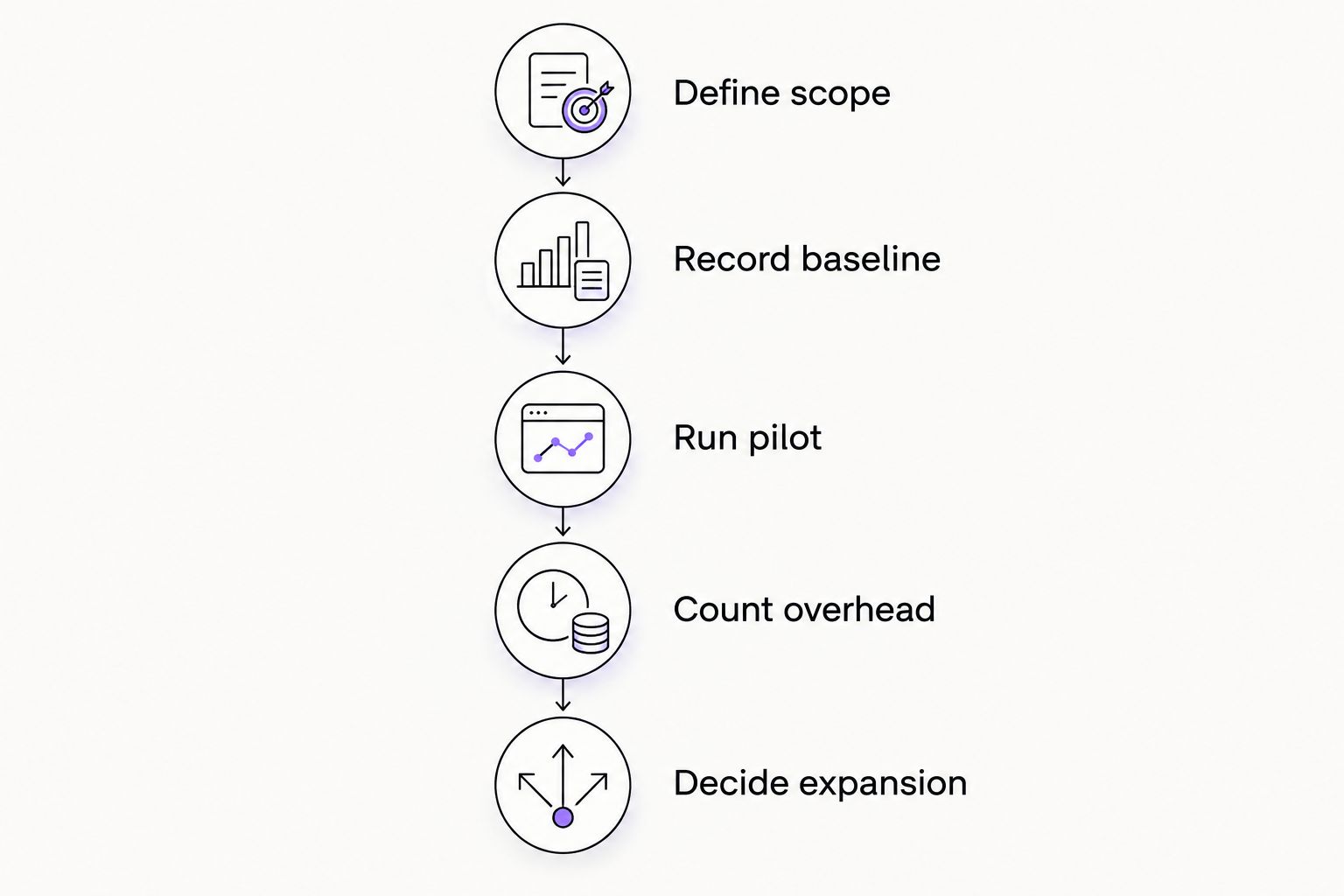
Count the remaining human work before deciding whether to expand.
When is custom agent development the right fit?
Arcgent is best for businesses seeking custom AI workflow automation built and maintained inside their existing software. That matches a need for an agency to build and maintain the workflow rather than simply supply a standalone application.
The benefit of that service model is a build centered on your defined process. The trade-off is the need to specify requirements, participate in testing, and assess ongoing maintenance as part of the business case.
Do not commission a custom agent merely because a workflow is repetitive. First check whether a straightforward rule or an existing software feature can complete the task correctly; choose the simplest approach that meets the requirement.
Before approving custom development in 2026, write down the process owner, acceptance criteria, required human approvals, and the source of the expected benefit. Those decisions make the project measurable.
Can a business save money without reducing headcount?
A business can save money without reducing headcount when automation removes another actual expense, such as overtime or outsourced processing. If spending stays unchanged, report recovered capacity rather than payroll savings.
Give that capacity a destination. Assigning recovered time to an identified backlog is a concrete operational plan; assuming employees will somehow become more productive is not.
Should every task run without human review?
Not every task should run without human review. Keep approval where an incorrect action would create an unacceptable consequence, and include that review in the savings calculation.
Separate preparation from authorization. A workflow can collect information and prepare a proposed action while leaving the final decision with an accountable employee.
How do you know when automation pays for itself?
Automation pays for itself when cumulative verified net benefits recover the implementation investment. Calculate that result using benefits after recurring operating expenses, not gross time saved.
If the recurring net benefit is not positive, the project does not have a positive financial payback under that calculation. Revisit the scope, operating burden, or value of the outcome before expanding.
FAQ
How much does AI workflow automation save a business in 2026?
AI workflow automation savings depend on the manual effort removed, the work that remains, and implementation and operating expenses. Calculate the result from your own workflow rather than applying a universal savings percentage.
What's the difference between time savings and cash savings?
Time savings are employee hours released from a task; cash savings are expenses the business actually removes. Recovered hours alone do not reduce payroll or other spending.
Can AI workflow automation help without replacing employees?
AI workflow automation can release employee capacity without replacing employees. Assign that capacity to identified work and measure the resulting output separately from expense reductions.
What costs should I include when calculating automation savings?
Include implementation, ongoing operation, human review, exception handling, monitoring, and maintenance. Apply a consistent measurement period and avoid counting the same work in multiple categories.
Is fully automated processing better than human-reviewed automation?
Fully automated processing is not automatically better than human-reviewed automation. Choose the level of review that meets the workflow's quality and approval requirements, then measure its remaining labor burden.
What does Arcgent do for business workflow automation?
Arcgent builds and maintains custom AI agents that automate repetitive business workflows inside the software companies already use. Evaluate the service against a defined workflow, acceptance criteria, and measurable business outcome.
What should I measure during an automation pilot?
Measure completed volume, active handling time, remaining human work, corrections, and operating expenses. Compare accepted outcomes against the manual baseline rather than counting automated executions alone.
One last thing
Measure human minutes per accepted outcome, not just time per attempted task. An automated run that requires rework has not delivered the same result as a correctly completed manual task.
Make that distinction part of your 2026 approval criteria. It keeps the decision focused on useful work delivered, with the remaining effort included.